EVO64CYC
18
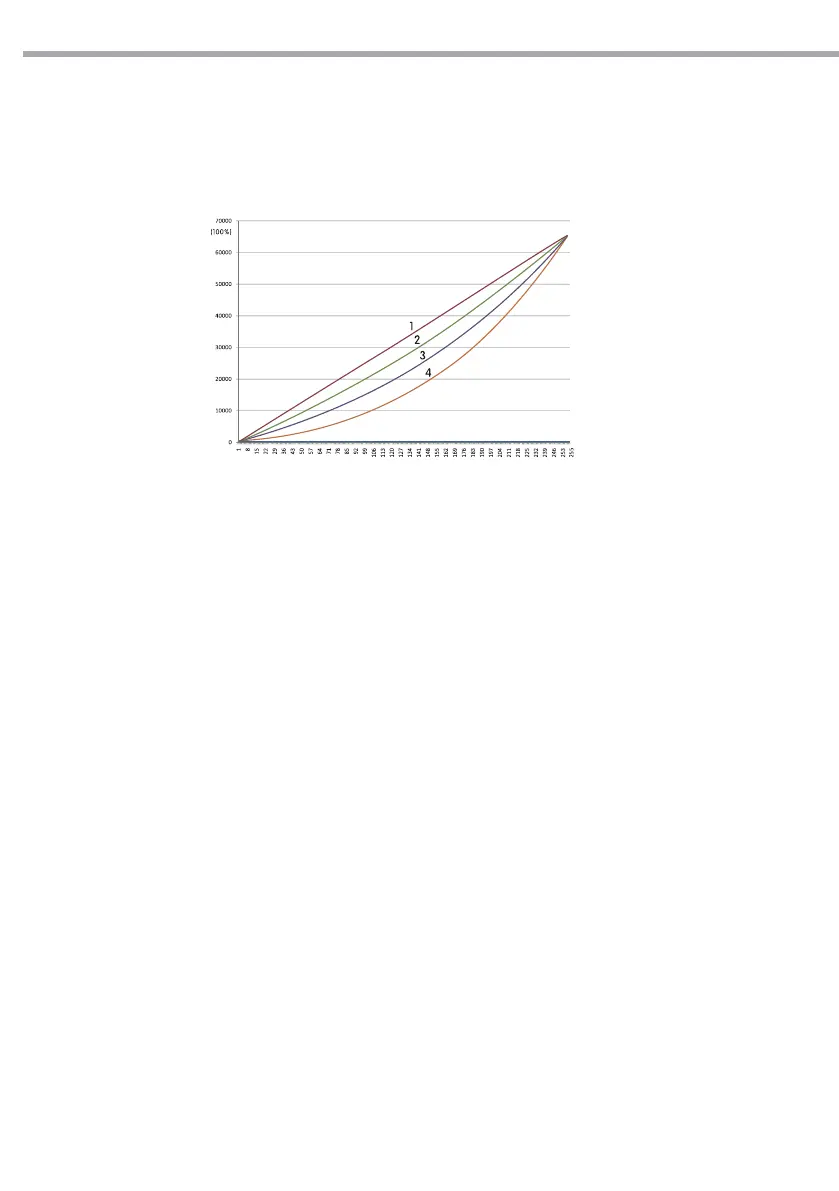
CURV dimming
1: OFF
2: CV1
3: CV3
4: CV4
Fig.9
CURV
[CURV] allows the user to adjust the shape of the dimming curve. See the CURV chart to understand
more about actual dimming curves.
DERR
Enter to [DERR] to control in case of DMX signal errors.
- [SAVE] saves the latest data DMX on error DMX signal.
- [BLACK] allows you to activate the mode on error DMX blackout.
SLCK
[SLCK] is used to lock the settings menu. When [SLCK] is set to ON the user must insert passcode (UP +
DOWN + UP + DOWN) in order to access the settings menu.
STRB
This xture allows for two dierent strobe personality settings, [CLAS] strobe or [SPEC] strobe. The [STRB]
settings are only valid in the DMX personalities TOUR, AR2.S and TR16.
3.16 CALIBRATION FUNCTION
Press the button MENU to enter the password conrmation, to enter the correct password
UP+DOWN+UP+DOWN button, press the MENU in the correct password will enter show submenu.
WHITE SETTING
Enter the [CAL] mode to select white color of dierent color temperature;
• Press the button MENU then press the button UP/DOWN so many times until show [CAL1]. Press the
button ENTER to conrm.
• There are 11 pre-programmed white colors (WHITE01 - WHITE11) can be edited by using red, green, and
blue (Red - Green - Blue - White - Ambe).
• Set the value (000 - 255), through the buttons UP and DOWN.



 To Next Page