7
SMARTBATPLUS
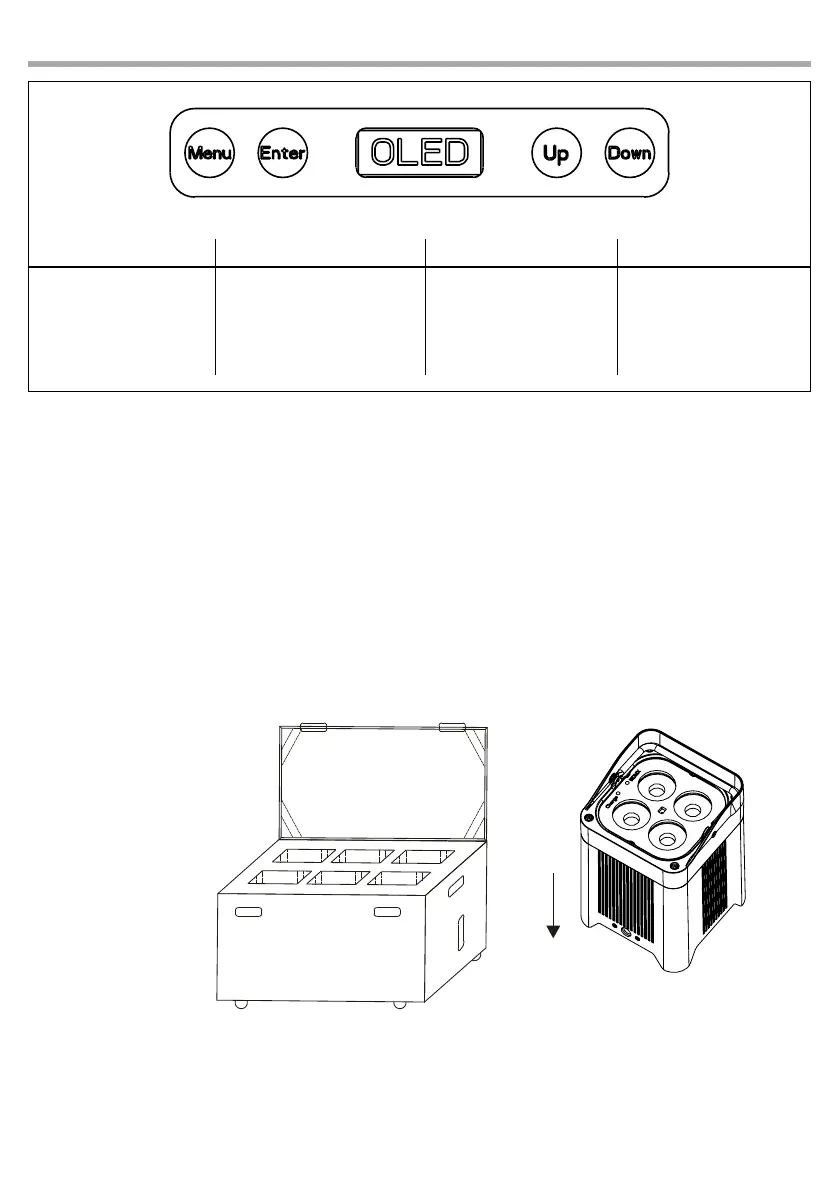
MENU UP DOWN ENTER
Used to access the menu or
to return a previous menu
option
Button to select the values
in ascending order of the
function
Button to select the values
in descending order of the
function
Used to select and store the
current menu or conrm the
current function value or
option within a menu
Fig.5 - Functions of the buttons
3.3 RECHARGE
To recharge SMARTBAT:
• connect the unit to the special battery charger through the lower connector
• connect the battery charger to the power supply
NOTE - The charging time are 4 h and autonomy is 12h
Flight-case SMARTBATPLUSPACK (optional)
Flight-case designed to contain 6pcs SMARTBATPLUS with battery charger kit included..
• Internal separated compartments with charger plug for every device
• Case power input: Powercon IN
• Dimensions (LxHxD): 537x540x470 mm
NOTE
Always charge with
ight-case open.



 To Next Page