7
Control
Panel/Functions
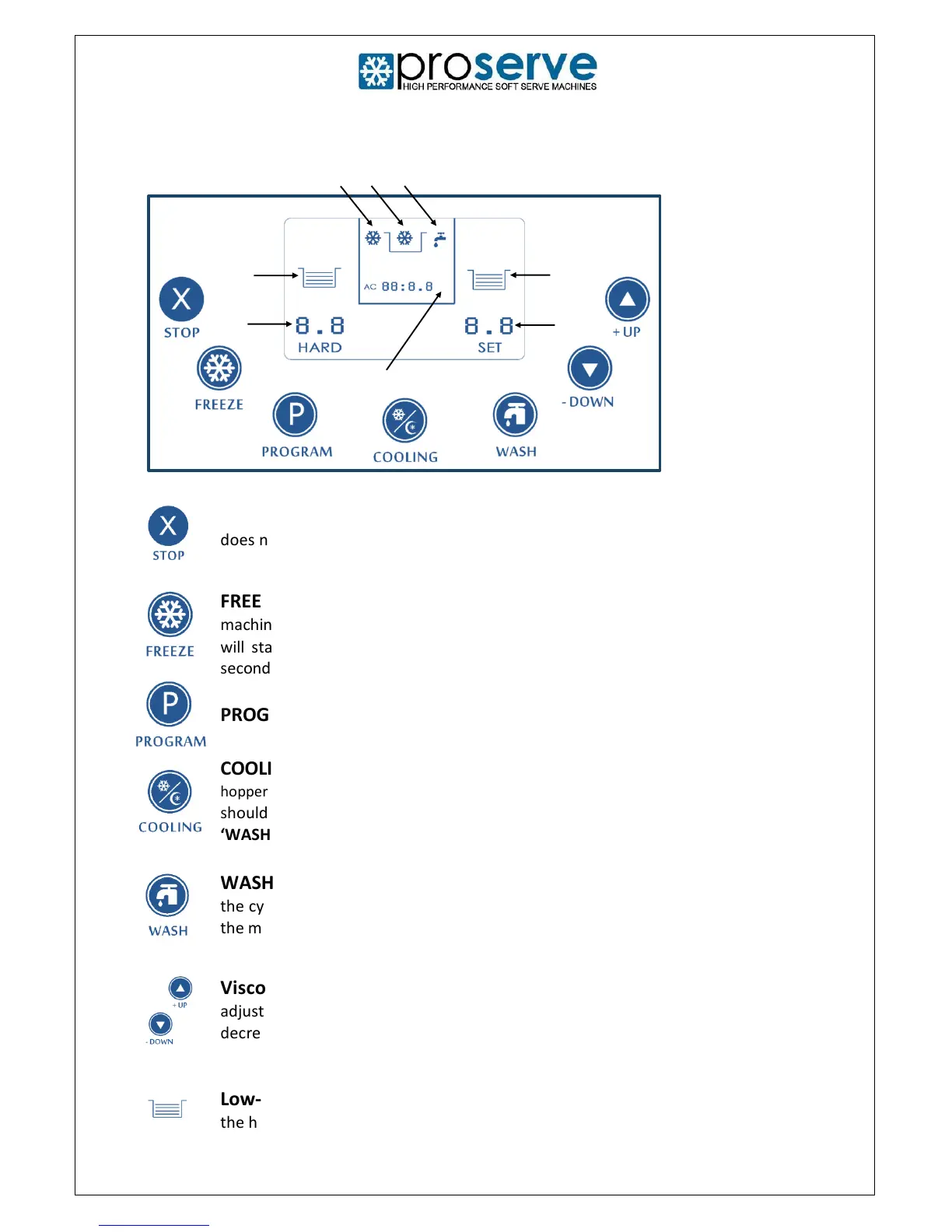
STOP: Press the STOP button to deactivate all other functions. However, this
does not apply to the ‘COOLING’ mode.
FREEZE: Press the FREEZE Button and the refrigeration icon will flash and the
machine will enter the automatic refrigeration mode. The compressor and fan
will start working once the beater motor has been working for approximately
5
seconds.
PROGRAM: For Engineer use only.
COOLING: Press the COOLING button to keep the mix chilled in the cylinder and
hopper between 0-5°C. Whenever there is product in the machine, this button
should be activated. This mode should only be deactivated when the machine is in
‘WASH’ mode.
WASH: Press the WASH button and the beater motor will begin to rotate within
the cylinder. Note: You will need to deactivate the ‘COOLING’ mode before placing
the machine in ‘WASH’ mode.
Viscosity (freezing level/hardness): Press the UP or DOWN buttons to
adjust the vis cosity (hardness) of the product. The hardness will increase or
decrease by a factor of 0.1 with each press of the button.
Low-level Indicator: When this icon flashes it means there is not enough mix in
the hopper.



 To Next Page