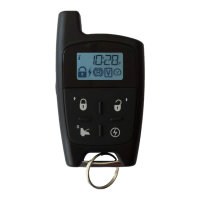
P. 12 User Guide CT-3400 TW
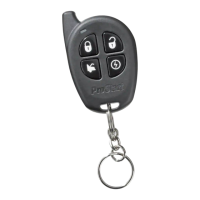
To l o c k your doors and a r m the system:
1. Press and hold the LOCK button for approximately 1 sec.
2. The parking lights will flash once and the LED will flash slowly to confirm that the doors have
been locked and that the starter kill feature is enabled if it was installed.
The horn will give one signal if configured at installation.
Cold Weather Mode
When cold weather mode is active, the engine starts every 2 hours and runs for 3 minutes (or for 8
or 20 minutes with diesel engines). Cold weather mode automatically ends after 24 hours. The
vehicle must be set in ready mode before the cold weather mode can be activated.
To enter Cold Weather Mode:
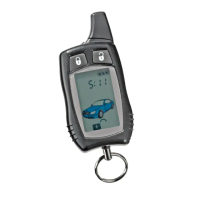
• Press and release the
button until you hear a beep. Release the button, will
appear, then press and hold the
button for 3 seconds until the parking lights flash three times.
The remote control will beep once and the
icon will appear on the display.
To exit Cold Weather Mode, do any one of the following actions:
• Open the hood.
• Start the engine by remote.
• Turn the ignition key to the
IGNITION ON (RUN) position.
• Press the button until you hear a beep. Release the button and will appear on the
display. Then press the
button for 3 seconds (the parking lights will flash once).
When the system exits cold weather mode, the remote control will beep once and the
icon will
disappear.
To verify whether the system is in cold weather mode:
• The icon should appear on your remote display.
Extended Run Time
While the vehicle is running under a remote start, pressing and holding the button for more
than 3 seconds will reset the run time counter to zero and restart the run time cycle from the
beginning. There will be three beeps and the parking lights will flash three times. The extended
run time procedure can only be carried out once per remote start.
To stop the vehicle, at any moment, simply press the
button.
Example: If your remote car starter is programmed for a run time of 3 minutes and your vehicle
has been running for 2 minutes already, pressing the
button will reset the counter to zero and
allow the engine to run for another cycle (in this case, 3 minutes).
Priority Door Access
When programmed, this safety feature lets you unlock solely the driver’s door with a single press of
the
UNLOCK button on the transmitter; upon a second press of the UNLOCK button, all the other
doors will unlock.
The user-selectable options are as follows:
• Remote Door Locks
• Safe Start
• Starter Kill/Anti-Grind
• Passive or Active Arming Starter Kill
• Ignition-controlled Door Locks
• Horn Honk on Lock
• Ignition Re-lock
• Remote Trunk Release
• Engine Run Time
• Turbo Mode (Turbo Cars)


 To Next Page