P2_GEPARD_installer manual_ work basis_EN_02 - 03/10 - protherm
- 21 -
INSTALATION
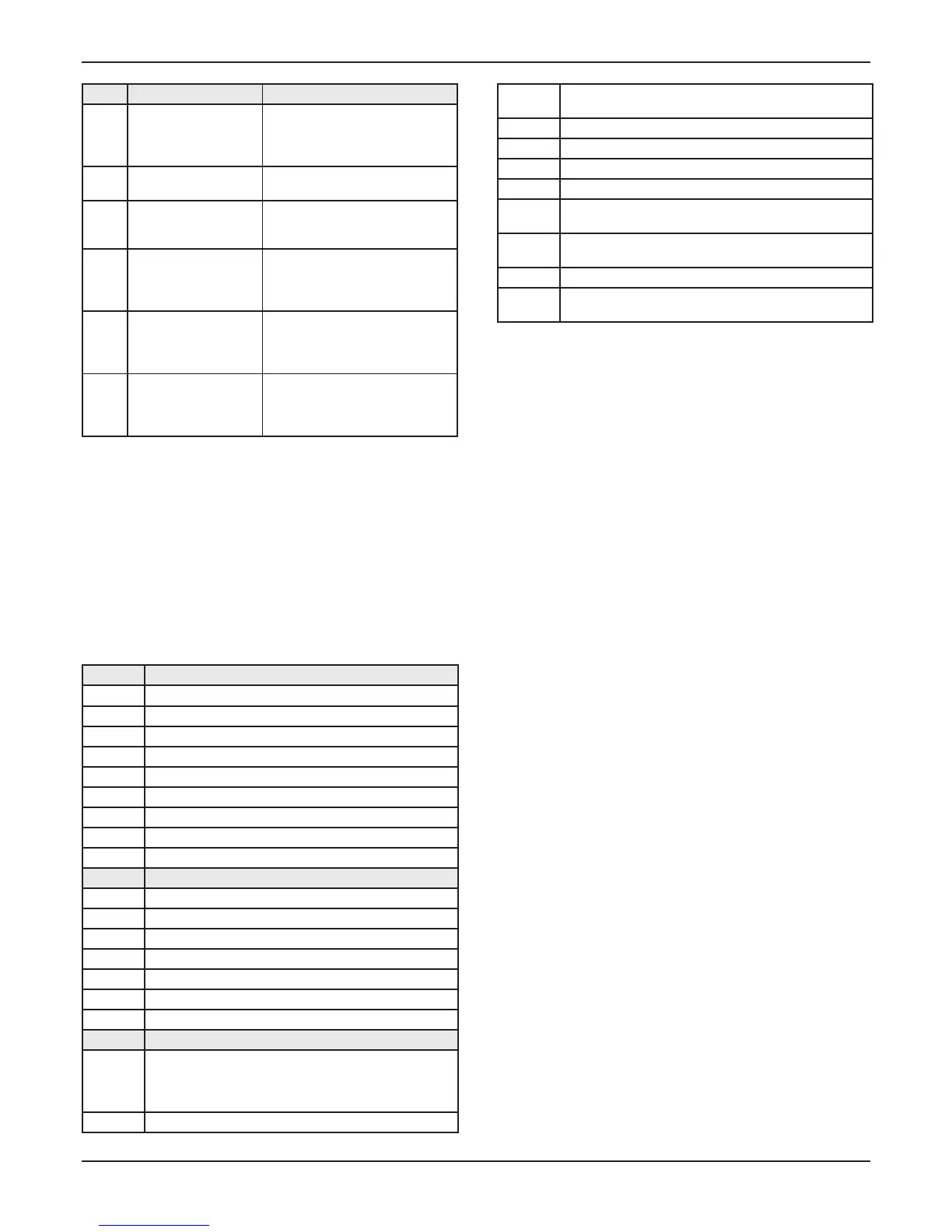
Code Parameter Description
P.01
Forcing the adjustable
power burner when
heating
The appliance functions at power
adjustable from Pmin. to 100% by
using buttons + or - on the right
side after successful ignition.
P.02
Forcing the burner to
heating ignition power
The appliance functions at ignition
power after successful ignition.
P.03
Forcing the burner to
heating Pmax
The appliance functions at its
maximum power after successful
ignition.
P.05 Filling the appliance
The 3 way valve is in the central
position, the pump and the burner
stop so that the appliance can be
fi lled.
P.06 Venting the installation
The function is activated for a
period of 5 minutes on the heating
circuit. Make sure that the air vent
is open.
P.07 Venting the appliance
The function is activated for a
period of 5 minutes on the short
circuit. Make sure that the air vent
is open.
Specifi c settings10
Status of the appliance10.1
Press button "-" for more 3 seconds to learn the current state •
of functioning of the appliance. The screen displays the state
of the appliance "S.XX".
Press button MODE for more than 3 seconds to exit this •
menu.
Status Heating mode
S.00 No request for heating
S.01 Pre-run fan
S.02 Pre- run pump
S.03 Ignition
S.04 Burner lit
S.05 Post run pump/fan
S.06 Post run fan
S.07 Post run pump
S.08 Time delay anti short-cycles after heating
Status Domestic hot water heating
S.10 Request for domestic hot water
S.11 Pre-run fan
S.13 Ignition
S.14 Burner lit
S.15 Post run pump/fan
S.16 Post run fan
S.17 Post run pump
Status Specifi c messages
S.30
Default status, no request for heating or domestic water. If
an EBUS controller is connected to the boiler, check that
a wiring link is present on terminals 3 and 4 of the boiler´s
main board.
S.31 "Hot water only" mode
S.32
Control cycle: the speed of the fan in the function phase
is outside tolerance.
S.34 "Frost protection" mode
S.39 Underfl oor heating contact open
S.40 Heating mode activated
S.41 Water pressure too high
S.53
Waiting cycle: temperature differantial between heating
fl ow and return is too high. If ∆T > 30, forcing to Pmin.
S.54
Waiting cycle: lack of water in the installation/temperature
rise between heating fl ow and return is too high.
S.96 Test temperature sensor for heating return
S.98
Test temperature sensors for heating fl ow and return, or
the appliance has a fault.
Technical settings and a list of equipment 10.2
parameters
Access to the installation and service mode is made as follows:
Press and hold the MODE button pressed until the symbol
appears on the display "0". Use "+" and "-" to set to display
the number "96" for the setup mode or the number "35" for
the service mode and confi rm the MODE button. Now we
are in mode, the display is shown of the parameter code and
the parameter value. Use "+" and "-" on the control panel we
choose the parameter and using the buttons "+" and "-" on
the control panel changing the value of the parameter. When
changing the value of the parameter number will display fl ash,
set the desired value, and wait until the value stops fl ashing.
This is automatically set to the value stored in memory.
The service climb mode, press and hold "MODE" to display the
basic display. Where a service mode for some time not doing
anything, the boiler itself automatically terminates service mode.



 To Next Page