EN
DE
LADEN CHARGING
Charging the battery
Your BT Com has a Lithium Ion battery with a runtime of 3-5 days on standby and 10
hours in Protos® Intercom operation. The runtime is dependent on surrounding factors
like cold temperatures. At low battery the LED will flash red 6 times and a
signal will be audible every 60 sec.. You can also check the battery charg-
ing status of your BT Com in the Protos® Control App at any time.
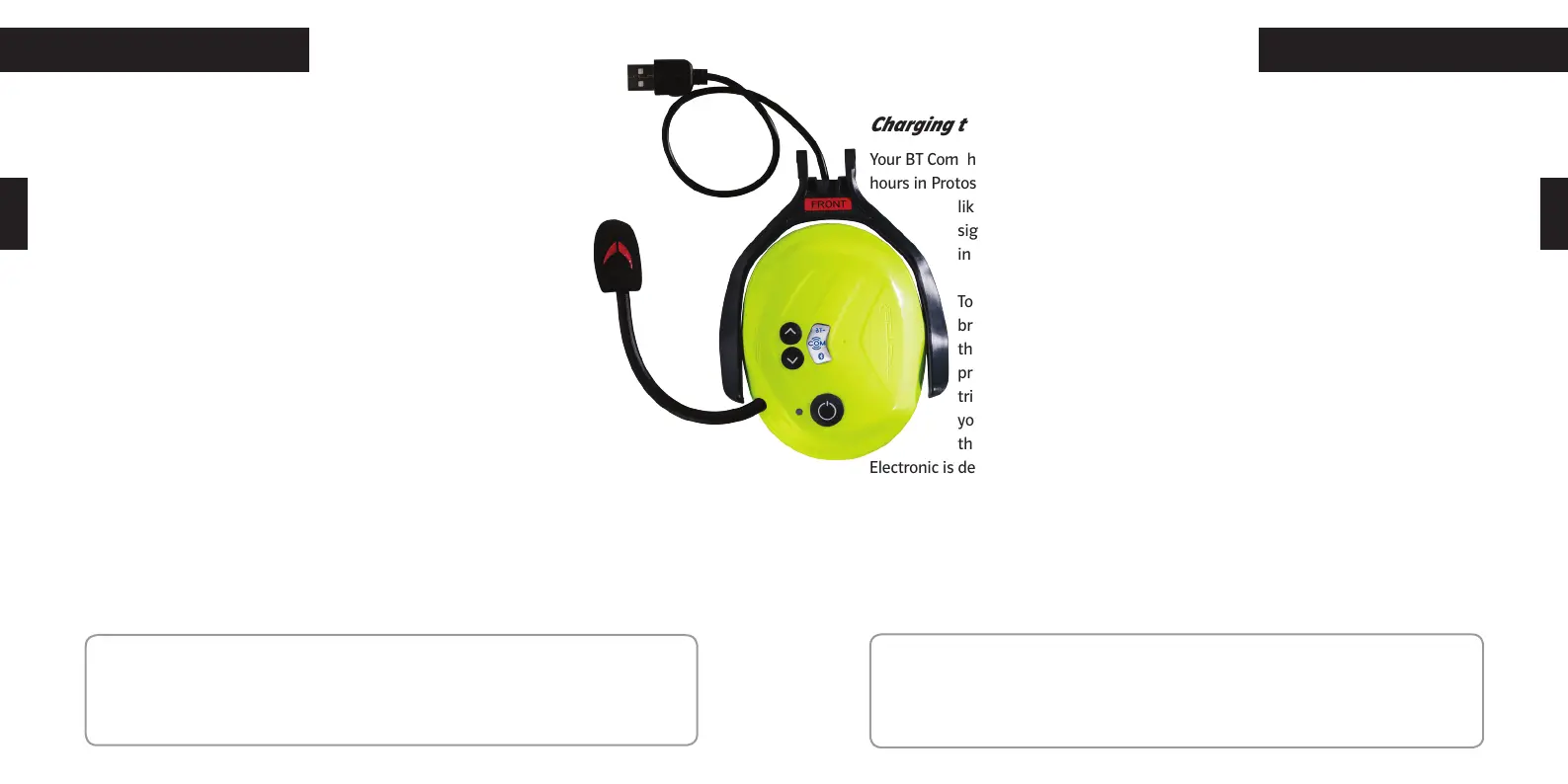
To charge the battery place the communication earmuff in the charging
bracket arm so that the label FRONT is on the same side as the buttons on
the communication earmuff. The LED will light up red during the charging
process. As soon as the charging is finished the BT Com will change to
trickle charging and the LED will change to a permanent green colour. If
your battery has not been used for an extended time, it can happen that
the charging electronic will not react promptly. The Protos® Bluetooth
Electronic is designed so that it will try to recover deeply discharged batteries. The
charging control light will blink as long as it takes to reactivate the battery for charg-
ing.
To achieve an optimum output the battery should be fully charged. The charging time
is approximately 30 Minutes for minimum charging and 1,5 hours for complete charg-
ing.
Laden der Batterie
Ihr BT Com hat einen Lithium Ionen Akku mit einer Laufzeit von 3-5 Tagen im
Standby und 10 Stunden im Protos® Intercom Betrieb. Die Laufzeit kann von
Umwelteinflüssen wie z.B. Kälte beeinträchtigt werden.
Bei niedrigem Akku-Stand blinkt die LED 6x hintereinander rot und ein
Signal ertönt im Abstand von 60 Sek.. Zudem könen Sie in der Protos®
Control App jederzeit den Ladestand Ihres BT Com kontrollieren.
Setzen Sie die Funkkapsel so in den Ladebügel ein, dass die Bedienele-
mente auf der Seite mit der Aufschrift „Front“ auf dem Ladebügel zu
sehen sind.
Die LED leuchtet während des Ladevorgangs rot. Die Elektronik wech-
selt automatisch auf Erhaltungsladung, wenn der Akku vollständig
gelanden ist. Der vollständig geladene Akku wird durch ein dauerhaft
grünes Leuchten der LED angezeigt.
Wenn der Akku längere Zeit nicht geladen wurde, ist es möglich, dass die Lade-
elektronik nicht gleich anspringt. Die Protos® Bluetooth Elektronik versucht tief-ent-
ladene Akkus wieder zu regenerieren. Die Ladekontrolle blinkt dann so lange, bis der
Akku wieder ladebereit ist.
Für eine optimale Leistung sollte der Akku vollständig geladen sein. Die Ladezeiten
betragen ca. 30 Minuten für eine Mindestaufladung und ca. 1,5 Stunden für eine voll-
ständige Aufladung.
Hinweis: Bitte entfernen Sie vor dem Laden immer die Dämmeinlage und Auf-
lagepolster um Staunässe vorzubeugen!
Sollte der Akku heiß werden, darf das Gerät keinesfalls weiter benutzt werden.
Bitte senden Sie es an den Fachhändler.
NOTE: Please always remove the insulation insert and padding always before
charging to prevent waterlogging!
If your battery becomes hot you must not use the device any more. Please send it
to your retailer.
30 31


 To Next Page
 Loading...