EN
DE
VERBINDEN CONNECT
Einmalige Inbetriebnahme eines Protos® Intercom Netzwerks
Um bis zu vier BT Com Funkkapseln zu verbinden, führen Sie bitte die Schritte 1-3
einmalig aus!
1.) Kopplung an Kapsel 1 auslösen
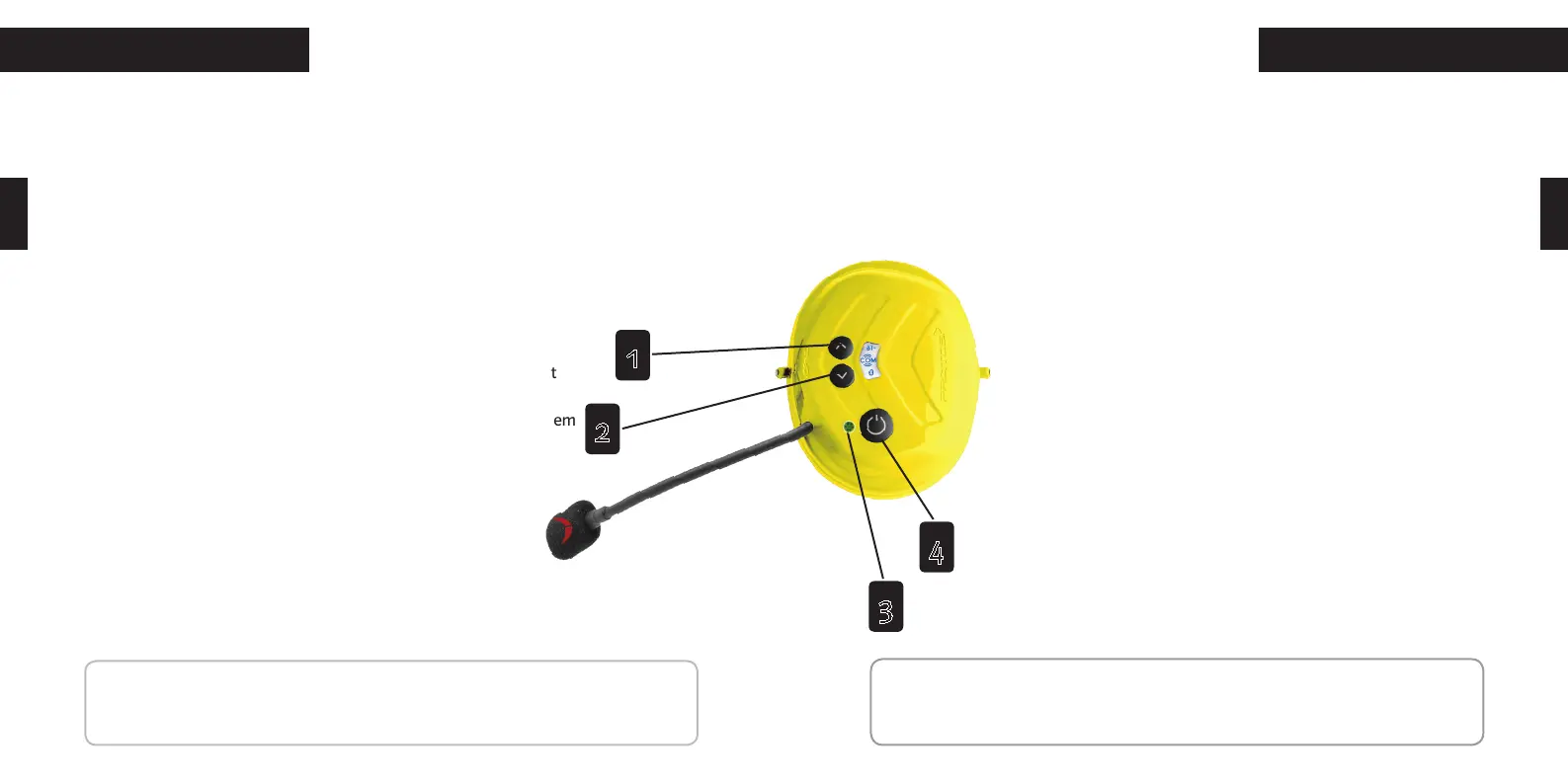
Drücken Sie gleichzeitig die Multifunktionstaste (4) und Aufwärtstaste (1)! Die LED (3)
blinkt abwechselnd in rot-grün.
2.) Kopplung an Kapsel 2 auslösen
Drücken Sie gleichzeitig die Multifunktionstaste (4) und Aufwärts-
taste (1). Die LED (3) blinkt abwechselnd rot-grün, die Kopplung mit
Kapsel 1 beginnt. Nach einigen Sekunden wechselt die LED (3) zu
violett. Nach einer Minute wird die erfolgreiche Kopplung mit grünem
Blinken bestätigt.
3.) Kopplung an Kapsel 3 und Kapsel 4 auslösen
Um Kapsel 3 ins Netzwerk einzubinden, wiederholen Sie die
vorherigen Schritte mit Kapsel 2 und Kapsel 3! Verfahren Sie
ebenso mit Kapsel 3 und 4, um Kapsel 4 einzubinden!
Für die Benutzung des Intercom Netzwerkes im täglichen Gebrauch beachten Sie bitte
die Anweisungen auf S.18!
Setting up a new Protos® Intercom Network
To connect up to four BT Com communication earmuffs, please execute the following
steps once:
1.) Start pairing mode for communication earmuff 1
Simultaneously press the multifunction button (4) and the up button (1).
The LED (3) flashes alternately in red-green.
2.) Start pairing mode for communication earmuff 2
Simultaneously press the multifunction button (4) and the up button
(1). The LED (3) flashes alternately red-green. Pairing with earmuff 1
begins. After a few seconds, the LED (3) turns purple. After one min-
ute, the LEDs (3) confirm successful pairing by flashing in green.
3.) Pairing earmuff 3 and earmuff 4
To connect earmuff 3 to the network, repeat the above described
steps with earmuff 2 and earmuff 3. Proceed accordingly with ear-
muff 3 and 4 to pair earmuff 4 into the Network.
The every day use of the Protos® Intercom Network is described on page
19.
NOTE: The initial pairing might take some time. Afterwards the devices recognize
each other and the connection will be built up faster.
16 17
4
3
2
1
HINWEIS: Anfänglich kann der Verbindungsaufbau zwischen den Geräten etwas
mehr Zeit in Anspruch nehmen. Danach erkennen sich die Geräte und der Verbind-
ungsaufbau erfolgt schneller.


 To Next Page
 Loading...