Language: To set up the menu language.
Note: After changing the language and video output, the device needs to login again.
Logout After (Minutes): You can set up the screen interval time (30s, 60s, 180s, 300s). If there is no any
operation within the setting period, the device will auto logout and return to the login interface.
No Image When Logout: If selected, there will be no image showing when logout.
5.1.2 Date & Time
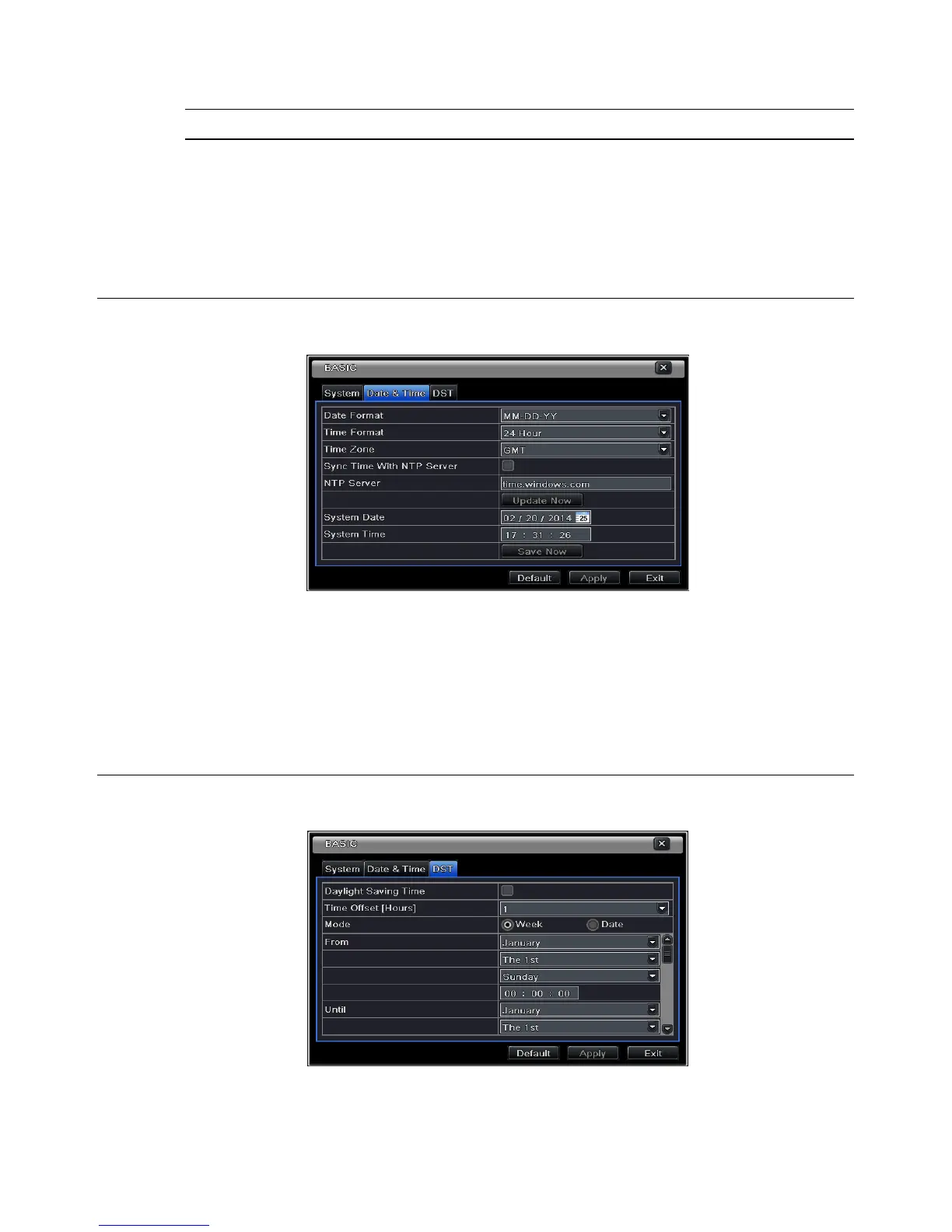
Step 1: Enter into MenuSetupBasicDate & Time tab. Refer to Fig 5-4:
Fig 5-4 Basic Configuration-Date & Time
Step 2: Set the date format, time format, time zone in this interface; checkmark “sync time with NTP
server” to refresh NTP server date. You can adjust system date manually
Step 3: Click “Apply” button to save the settings.
5.1.3 DST
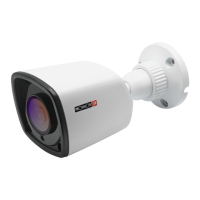
Step 1: Enter into MenuSetupBasic DST interface. Refer to Fig 5-5:
Fig 5-5 Basic Configuration-DST
Step 2: In this interface, enable daylight saving time, time offset, mode, start & end month/week/date, etc.
Step 3: Click “Apply” button to save the setting.


 To Next Page