EasyManua.ls Logo

Provision ISR IP Series - Remote Controller

Provision ISR IP Series
73 pages
Print Icon
To Next Page IconTo Next Page
To Previous Page IconTo Previous Page
Loading...
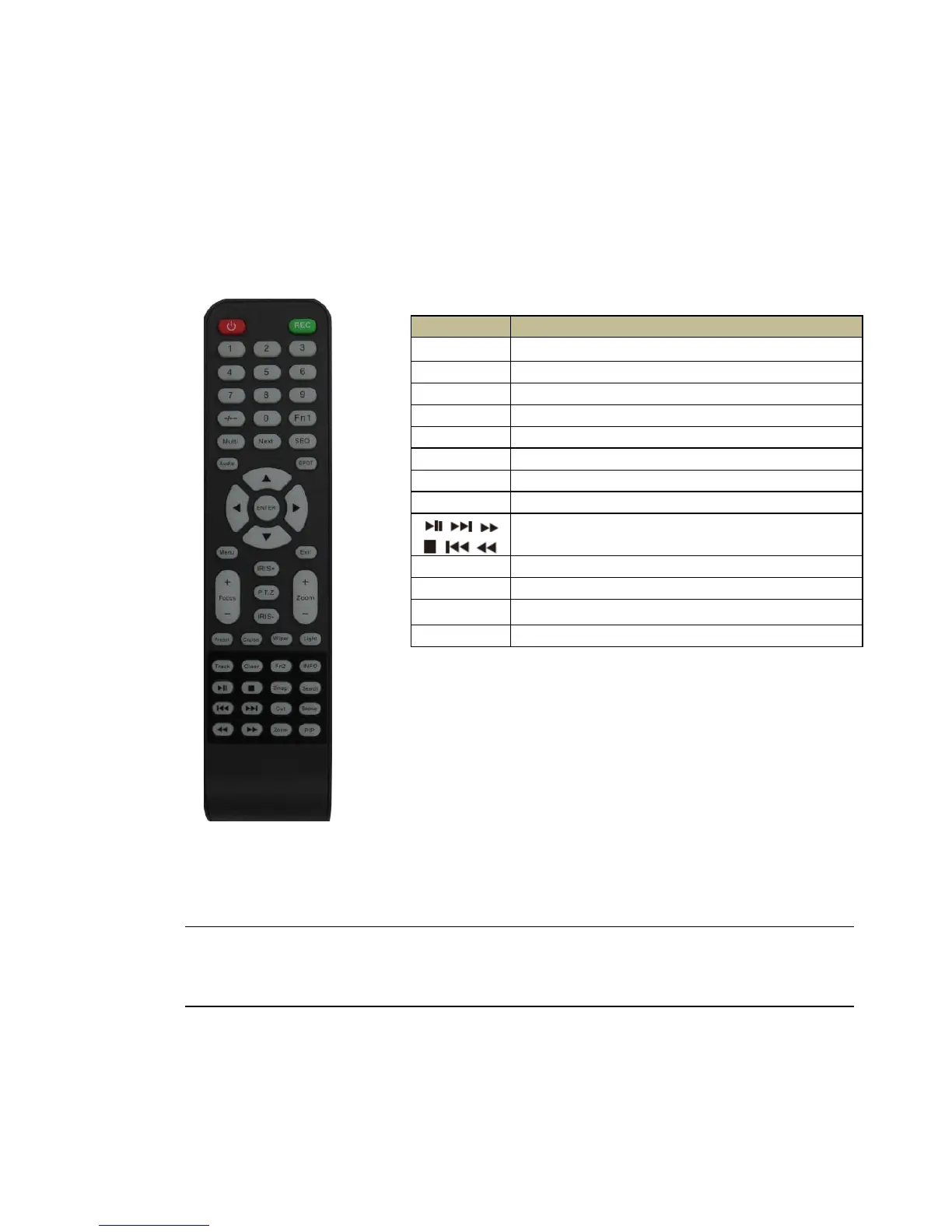
2.3 Remote Controller
It uses two AAA size batteries.
Open the battery cover of the Remote Controller.
Place batteries. Please take care of the polarity (+ and -).
Replace the battery cover.
Fig 2-6 Remote Controller
Key points to check in case the remote doesn’t work.
1. Check batteries polarity and the remaining charge in the batteries.
2. Check IR controller sensor for any masking.
3. Check the ID of the remote with respect to the NVR.
If it still doesn't work, please try using a good known remote, or contact your dealer.

Button
Function
REC
Manually start/stop record (manual mode).
Search
Open the search menu.
MEUN
Open the main menu.
Exit
Exits the current interface without saving.
ENTER
Save/confirms the current setup on the current menu.
Direction
Moves the menu.
ZOOM
Activates zoom mode.
PIP
Activates picture in picture mode
During playback mode: play / Pause / Stop / Previous Section
/ Next Section / Rewind / FF
Multi
To choose multi-screen display mode.
Next
To switch between single picture and picture group
SEQ
Activate sequence (auto dwell) mode
INFO
Go to NVR information menu (from main view)

Table of Contents

Related product manuals