EasyManua.ls Logo

Prozeda Primos 250 SR - Display Screen Elements

Prozeda Primos 250 SR
52 pages
Print Icon
To Next Page IconTo Next Page
To Previous Page IconTo Previous Page
Loading...
Operating the controller
20
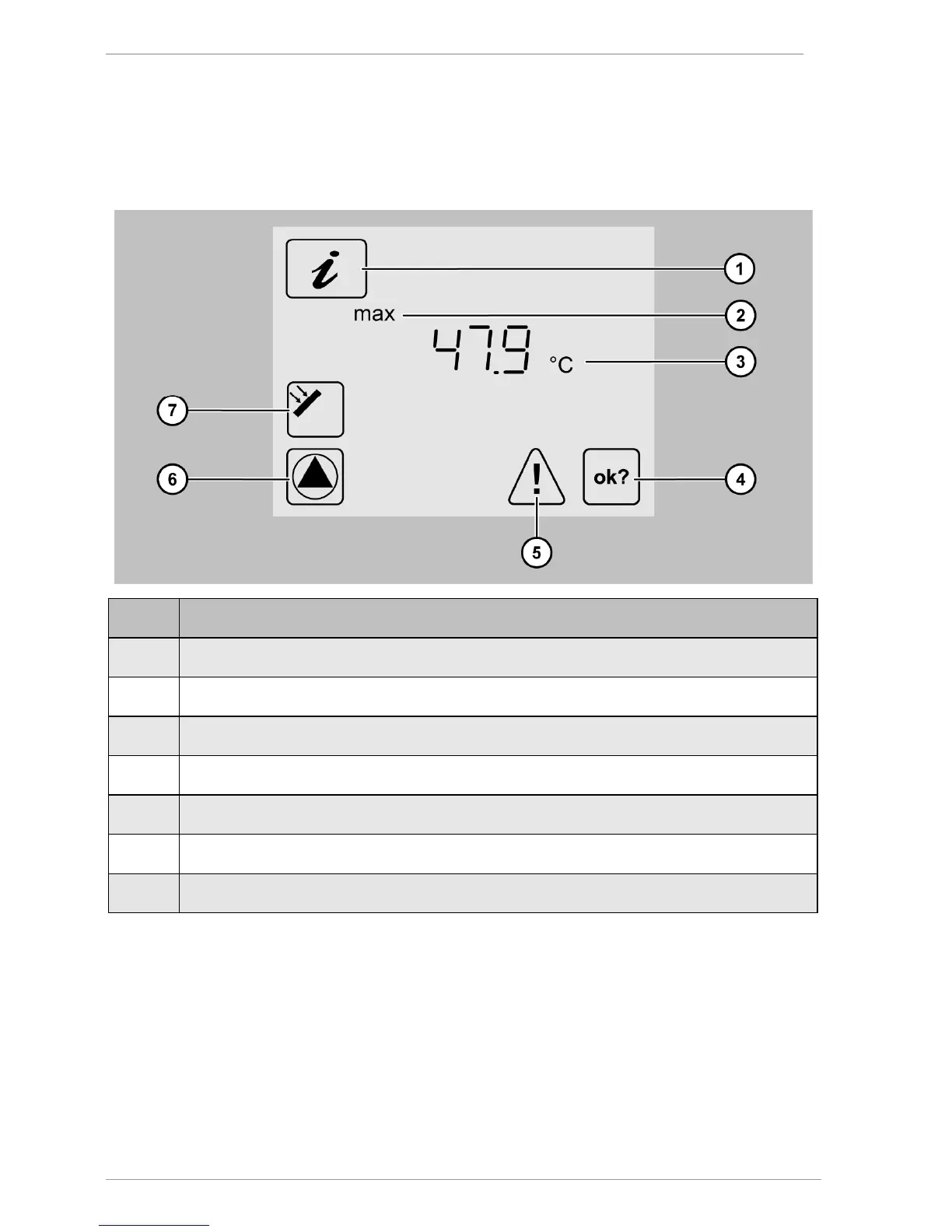
When you have selected a menu, the applicable menu symbol (1) will be displayed. The
bottom section of the screen displays the value (3) complete with a corresponding addition
(2) and a measurement value symbol (7). Below these, status information and messages may
be displayed (4–6), depending on the specific menu item. The following illustration shows a
display screen by way of illustration:

Pos.
Description
1 Active menu (In this case: "Info" menu)
2
Addition to the value displayed
3
Value
4
OK symbol. If you make any changes to a value, this symbol flashes.
5
Fault symbol. This symbol flashes in the event of a fault.
6
Pump symbol. This symbol rotates whenever the pump is switched on.
7
Measurement point symbol (In this case: Collector)

Table of Contents

Related product manuals