EasyManua.ls Logo

Psion 3a Series - Operators

Psion 3a Series
288 pages
Print Icon
To Next Page IconTo Next Page
To Previous Page IconTo Previous Page
Loading...
Eg
3
Remember
that,
as
long
as
you
have
not
highlighted
a
range,
the
quickest
way
to
go
to
A1
is
to
press
Control-Home
(Control-Psion-«-).
If
a
range
is
already
highlighted,
you
can
use
'Jump
to'
to
jump
to
one
of
the
corners
of
the
highlighted
range.
The
top
line
of
the
'Jump
to'
dialog
will
also
offer
options
for
named
ranges
and
circular
references,
if
they
exist
in
your
worksheet.
These
are
covered
later.
Operators
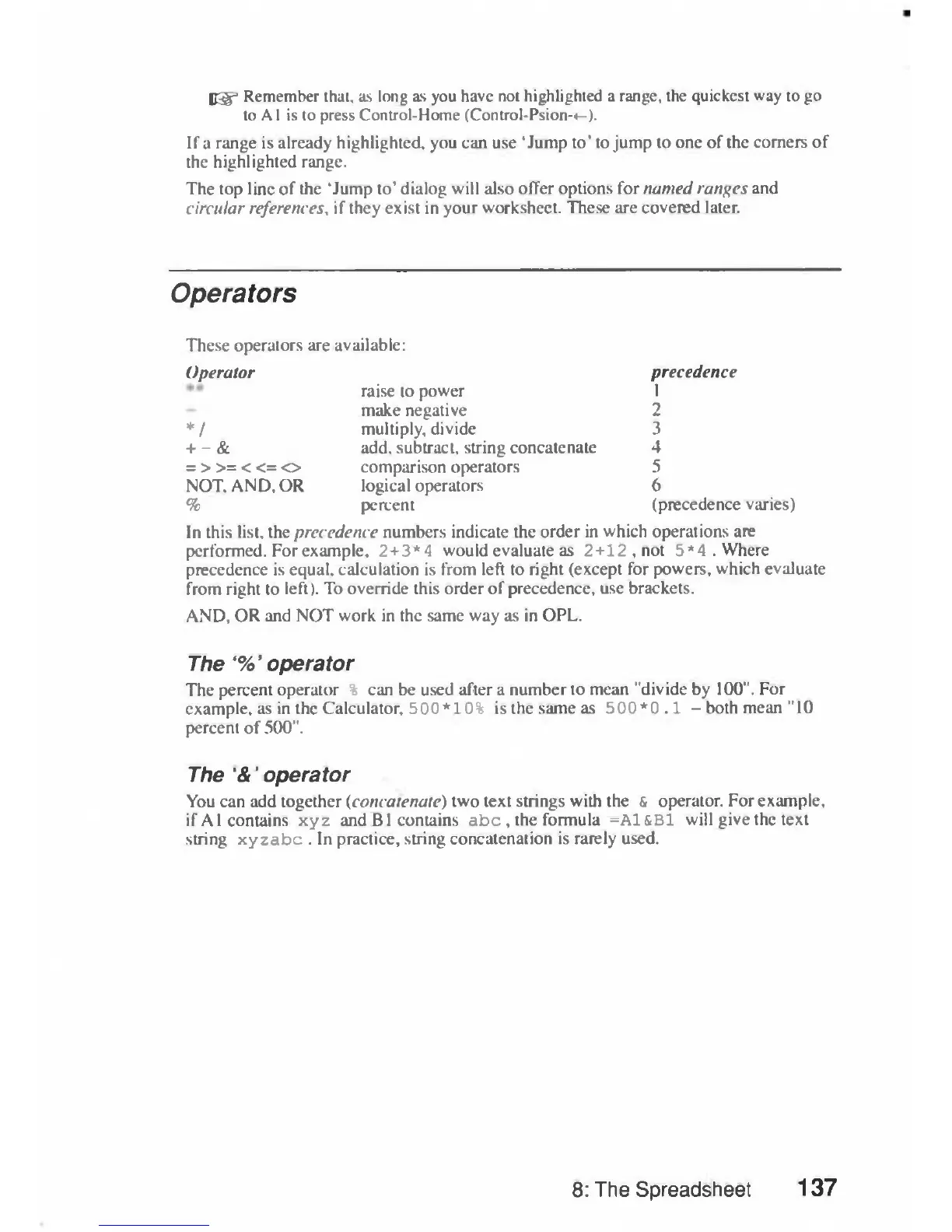
These
operators
are
available:
Operator
precedence
raise
to
power
1
make
negative
2
*
/
multiply,
divide
3
+
-
&
add,
subtract,
string
concatenate
4
=
>>=<<=
o
comparison
operators
5
NOT.
AND,
OR
logical
operators
6
%
percent
(precedence
varies)
In
this
list,
the
precedence
numbers
indicate
the
order
in
which
operations
are
performed.
For
example,
2+3*4
would
evaluate
as
2+12,
not
5*4.
Where
precedence
is
equal,
calculation
is
from
left
to
right
(except
for
powers,
which
evaluate
from
right
to
left).
To
override
this
order
of
precedence,
use
brackets.
AND,
OR
and
NOT
work
in
the
same
way
as
in
OPL.
The
'%'
operator
The
percent
operator
%
can
be
used
after
a
number
to
mean
"divide
by
100".
For
example,
as
in
the
Calculator,
500*10%
is
the
same
as
500*0.1
—
both
mean
"10
percent
of
500".
The
'&'
operator
You
can
add
together
(concatenate)
two
text
strings
with
the
&
operator.
For
example,
if
A1
contains
xyz
and
B1
contains
abc
,
the
formula
=A1&B1
will
give
the
text
string
xyzabc
.
In
practice,
string
concatenation
is
rarely
used.
8:
The
Spreadsheet
137

Table of Contents

Related product manuals