EasyManua.ls Logo

Psion 3a Series - Entering a database

Psion 3a Series
288 pages
Print Icon
To Next Page IconTo Next Page
To Previous Page IconTo Previous Page
Loading...
Printing
graphs:
.PIC
files
As
the
Series
3a
does
not
have
graphics-based
printer
drivers,
you
cannot
print
graphs
directly.
You
can,
however,
save
graphs
as
"industry-standard"
.PIC
files,
and
then
use
spreadsheets,
word
processors,
or
print
utilities
on
other
computers
to
print
them.
|Eg=
The
.PIC
files
mentioned
here
have
no
connection
with
OPL
bitmaps,
which
also
use
.PIC
as
the
default
file
extension.
Use
the
'Create
.PIC
file'
option
on
the
'Special'
menu.
The
'Colour'
line
of
the
dialog
controls
whether
areas
are
saved
as
filled
blocks
('Yes')
or as
shading
patterns
('No').
If
you
intend
to
use
a
black
and
white
printer,
set
'Colour'
to
'No'.
You
can
change
the
shading
pattern
used
for
a
set
of
figures
bv
entering
it
in
a
different
graph
range
('A'
to
'F').
In
fact,
colour
information
is
always
saved,
but
will
only
be
used
if
you
print
to
a
colour
printer.
The
.PIC
file
format
stores
information
on
the
items
which
make
up
the
graph.
It
is
not
a
pixel-by-pixel
format;
the
resolution
and
precise
detail
of
the
printed
graph
depend
on
the
resolution
of
your
printer,
and
of
the
program
which
prints
the
.PIC
file.
Note,
however:
All
bar
graphs
are
stored
as
2D.
Only
pie
charts
can
be
3D.
Titles
are
always
shown,
if
set
even
if
they
are
not
shown
on
screen.
A
guide
to
the
different
graph
ranges
is
always
included.
This
performs
the
same
function
as
the
box
shown
by
the
'View
legends'
option,
which
is
itself
not
included
in
the
.PIC
file.
H35=
.PIC
files
are
by
default
kept
in
a
\SPR
directory
-
the
same
as
worksheet
files
themselves.
Entering
a
database
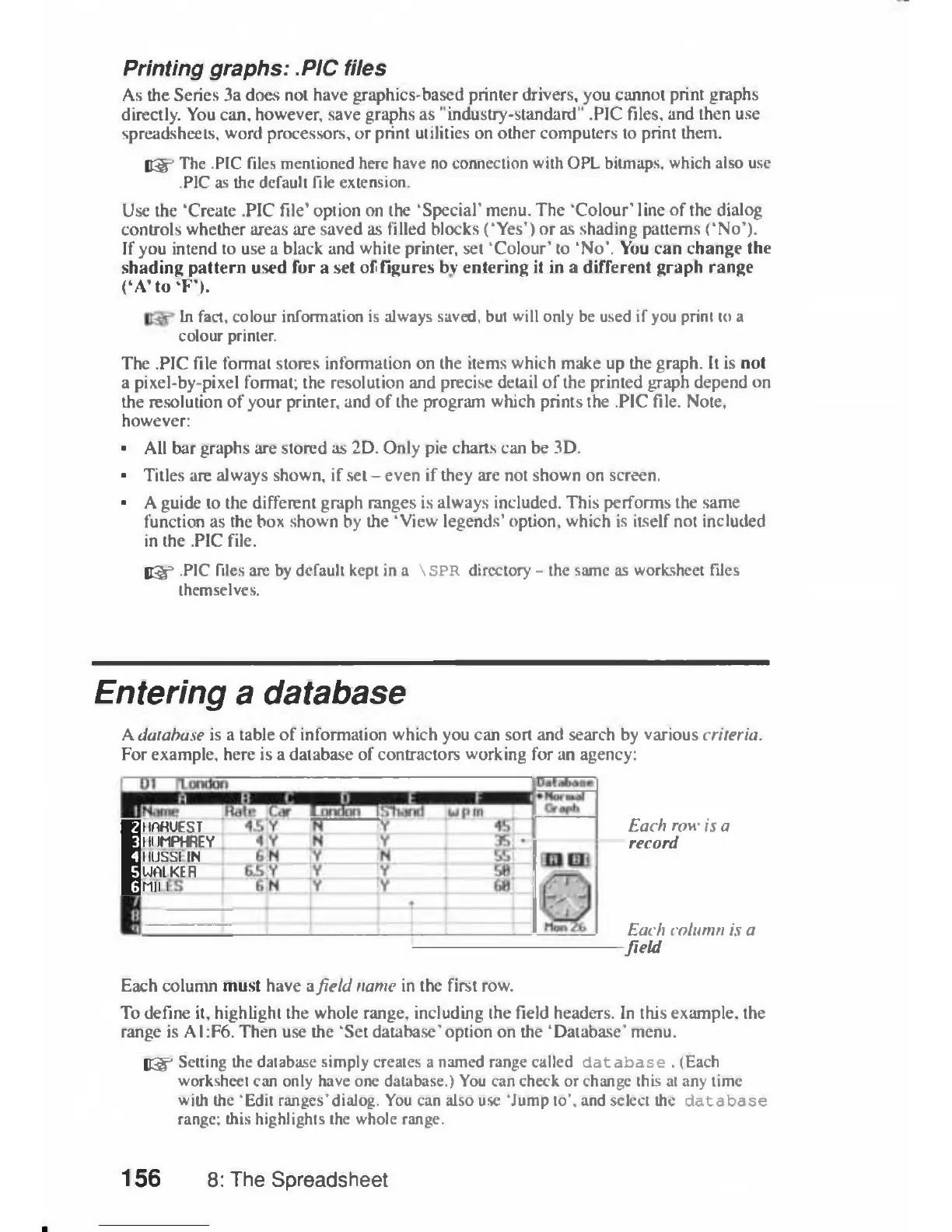
A
database
is
a
table
of
information
which
you
can
sort
and
search
by
various
criteria.
For
example,
here
is
a
database
of
contractors working
for
an
agency;
BHARUEST
BHUMPHREY
EjllUSSI
IN
Eualker
Em:
i
Each
row
is
a
record
Each
column
is
a
field
Each
column
must
have
afield
name
in
the
first
row.
To
define
it,
highlight
the
whole
range,
including
the
field
headers.
In
this
example,
the
range
is
A1:F6.
Then
use
the
'Set
database'option
on
the
'Database'
menu.
lEg
3
Setting
the
database
simply
creates
a
named
range
called
database
.
(Each
worksheet
can
only
have
one
database.)
You
can
check
or
change
this
at
any
time
with
the
'Edit
ranges'dialog.
You
can
also
use
'Jump
to',
and
select
the
database
range;
this
highlights
the
whole
range.
156
8:
The
Spreadsheet

Table of Contents

Related product manuals