EasyManua.ls Logo

Psion 3a Series - The saved file on the disk

Psion 3a Series
288 pages
Print Icon
To Next Page IconTo Next Page
To Previous Page IconTo Previous Page
Loading...
Example
setups
You
may
wish
to
make
further
modifications
to
one
of
the
example
setups
outlined
below,
to
suit
your
use
of
the
Agenda.
Note:
apart
from
'To-do
list
settings',
which
has
its
own
menu
option,
the
settings
referred
to
in
these
examples
are
suboptions
of
'Set
preferences'.
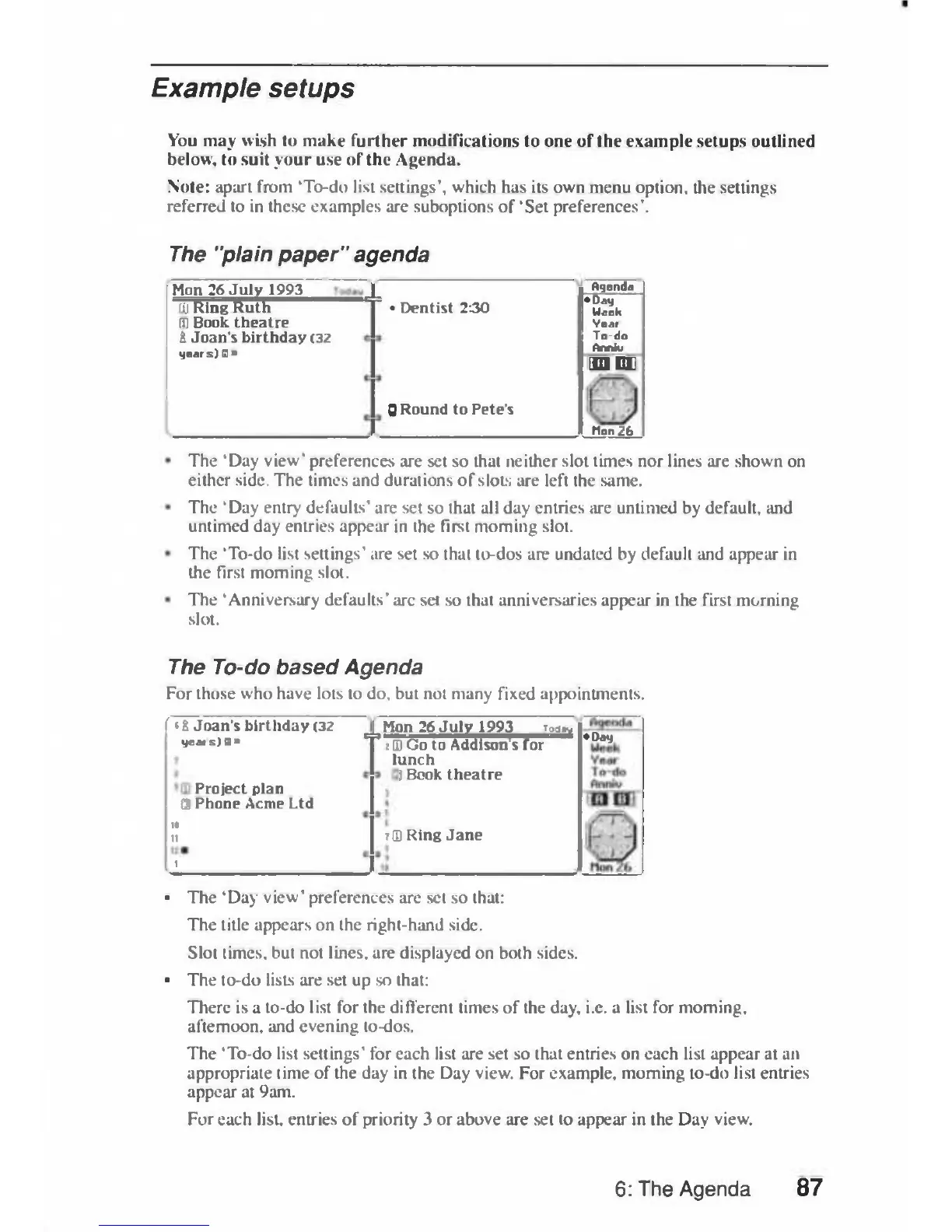
The
"plain
paper"
agenda
Hon
26
July
1993
fij
Ring
Ruth
IT)
Book
theatre
&
Joan's
birthday
(32
years)
Oqendd
Dentist
230
Day
Week
Vear
To-do
Ann*
M
EL
0
Round
to
Pete's
Hon
26
The
'Day
view'
preferences
are
set
so
that
neither
slot
times
nor
lines
are
shown
on
either
side.
The
times
and
durations
of
slots
are
left
the
same.
The
'Day
entry
defaults'
are
set
so
that
all
day
entries
are
untimed
by
default,
and
untimed
day
entries
appear
in
the
first
morning
slot.
The
'To-do
list
settings'
are
set
so
that
to-dos
are undated
by
default
and
appear
in
the
first
morning
slot.
The
'Anniversary
defaults'
arc
set
so
that
anniversaries
appear
in
the
first
morning
slot.
The
To-do
based
Agenda
For
those
who
have
lots
to
do,
but
not
many
fixed
appointments.
f
'4
Joan's
birthday
(32
yeais)B»
Project
plan
©
Phone
Acme
Ltd
u
11
1
^m
n
26
July
1993
:(D
Go
to
Addi'
lunch
i
Book
theatre
;!D
Ring
Jane
i
J
Toa
-'
ison
s
for
Day
The
'Day
view'
preferences
are
set
so
that:
The
title
appears
on
the
right-hand
side.
Slot
times,
but
not
lines,
are
displayed
on
both
sides.
The
to-do
lists
are
set
up
so
that:
There
is
a
to-do
list
for
the
different
limes
of
the
day,
i.e.
a
list
for
morning,
afternoon,
and
evening
to-dos.
The
'To-do
list
settings'
for
each
list
are
set
so
that
entries
on
each
list
appear
at
an
appropriate
time
of
the
day
in
the
Day
view.
For
example,
morning
to-do
list
entries
appear
at
9am.
For
each
list,
entries
of
priority
3
or
above
are
set
to
appear
in
the
Day
view.
6:
The
Agenda
87

Table of Contents

Related product manuals