55
ENT
ENT
ENT
ENT
ENT
SUBMENUS ()
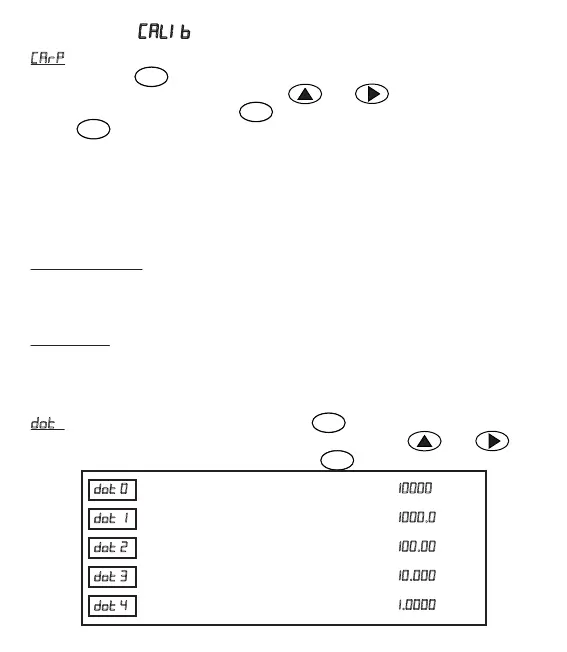
= The page where weight value as well as mulplicaon pamameter of the
factor is entered. When pressed the key, value starts to flash, in this case
desired value can be entered with the keys and . Factor value can be
entered between 0,800 and 1,200. Value is confirmed and saved by pressing
the key .
Intended use of this parameter is as follows;
The weight value measured aer calibraon of the device and the value you will
obtain when you weigh it at another scale of which accuracy you already know must
be the same in both display screens. In case the displays differ from each other, by
just changing the factor value, without requiring the calibraon to be made again the
value indicated in both the screens are to be the same.
IMPORTANT NOTE: BEFORE CALIBRATING THE DEVICE, THIS VALUE MUST BE
ADJUSTED AS 1,000. IN CASE OF A DIFFERENT VALUE, SINCE DEVICE WILL SHOW THE
WEIGHT VALUE ON THE BASIS OF FACTOR VALUE, THEN ERRONEOUS CALIBRATION
WOULD HAVE BEEN MADE.
For example: The weight value measured in the transmier screen is = 1000 g,
The weight value measured in the scale is = 1005 g; Weight value obtained from scale
is divided to the weight value obtained from device.
So, 1005/1000=1.005 and accordingly factor value is found out as 1.005.
= In this page, place of dot is determined. When pressed on the key,
screen starts to flash. Desired value can be entered via the keys and .
Value is confirmed and saved by pressing the key .
Once selected, display view is as follows:
Once selected, display view is as follows: .
Once selected, display view is as follows: .
Once selected, display view is as follows: .
Once selected, display view is as follows: .


 To Next Page