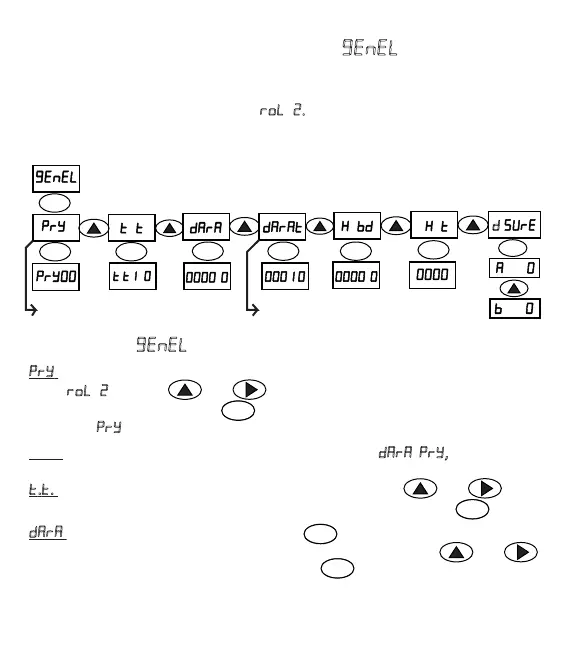
SUBMENUS ()
= The page where tare frequency is entered. This parameter is used in the
mode . Via keys and automac tare value is entered (0-99). Value
is confirmed by pressing the key . The value entered in the automac tare
frequency (
) means the process number.
Note: If a value different than zero is entered in parameter
, , parameter
cannot be changed.In this case, it is fixed to 1.
.. = The page where start delay me is entered. Via the keys and value
is entered as second (0.0-9.9). Value is confirmed by pressing on the key .
= The page where tare value is entered. When pressed the key, value
starts to flash, in this case desired value can be entered with the keys and
Value is confirmed and saved by pressing the key . How the parameter is used is
illustrated with the basic applicaon examples below.
63
g. GENERAL MENU ()
In this page, parameters such as automac tare frequency, start delay me, tare and
tare tolerance values, material control belt and material control me can be entered.
The user can see while filling on mode
. It shows how long the filling has taken
in seconds.
ENT
ENT ENT
ENT ENT ENT
ENT
ENT
.
. .
.
.
.
.
.
.
. .
ENT
ENT
ENT
ENT
Start Delay
Time
Automac Tare
Period
Tare Filling, Tare Tolerance Value
Unpacked Filling Empty Value
As Used
Tare Package
Filling Value
**Dual
Funcon
Product Control
Band
Product Control
Time
Filling
Time


 To Next Page