61
ENT
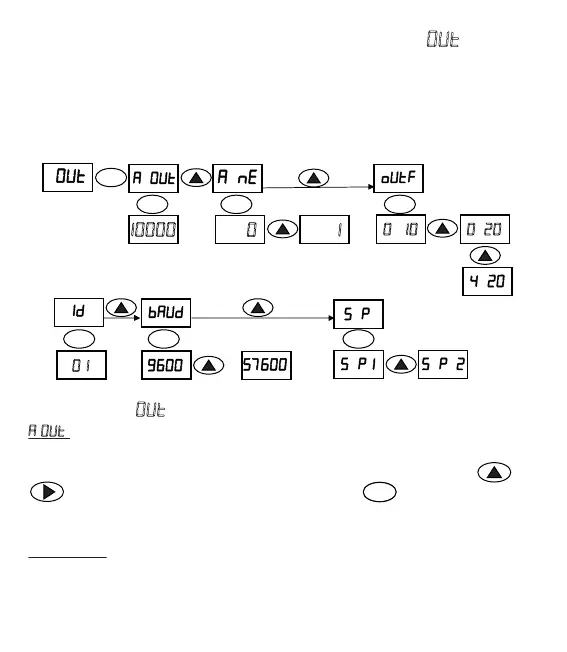
f. OUTPUT CONFIGURATION MENU ()
The page where output configuraon parameters are entered. In this page, user can
enter Analogue Output, Analogue Minus, Baud Rate, ID, Analogue Output Funcon
and Serial Port Mode parameters.
ENTENT ENT
ENT
ENT ENT ENT
..
. .
.
.
SUBMENUS ()
. = The page where weight value corresponding to the maximum analogue
output value is entered. The weight value at which analogue output is maximum is
changed with this parameter. The desired value can be entered via the keys and
. Value is confirmed and saved by pressing the key . You can take the full
scale, 16 bit analogue output up to the 1/20 of the Load Cell capacity.Analogue Output
can be adjusted between 250 to 99999.
For example: In weighing system where a Load Cell with a 20 kg capacity is used, if
we want 10V or 20 mA in turn for 10 kg load; it is necessary to enter this value as 10 kg
even tough Load Cell capacity is 20 kg. As a result, Analogue output will have been
programmed so that it will give 10V or 20 mA at 10 kg.
Max. Analogue
Output Set Value
Analogue
Output Select
ID number
Modbus RS 485
Free Protocol
Communicaon
Speed
Communicaon
Mode Select
Negave Analogue
On / Off
....


 To Next Page