72
ESC
8. ERROR CODES
In case device produces error, you can return to the normal display screen via the key
. You can find the list of error codes below;
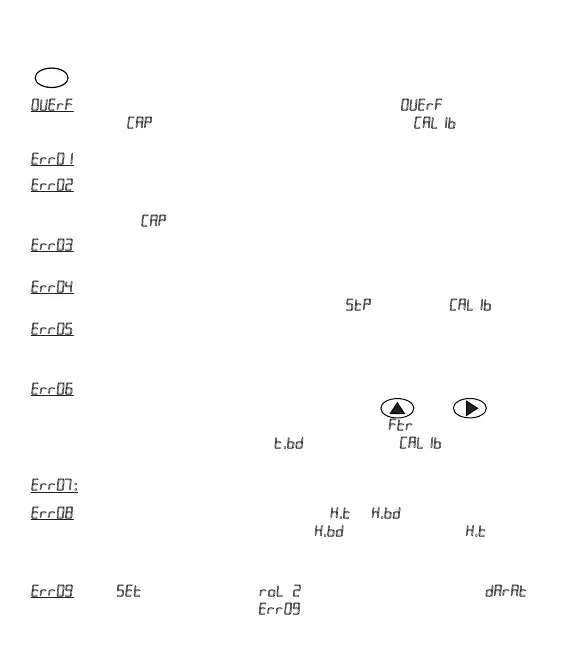
: If measured value exceeds the load cell capacity, then appears on the
screen. Check if parameter is entered correctly in the menu and no
overload is placed on the weighing system.
: Load Cell connecon error. Check the load cell connecon.
: During span calibraon, if no Span value is entered or very small span value
is selected then this error appears. Span value cannot be lower than %1 of the
LoadCell capacity (
) value. Enter a correct value to the span calibraon.
: Aer zero calibraon is made, while span calibraon is set, if scale is not
loaded, then this error is produced. Place a suitable weight on the scale, try again.
: If the value entered for span calibraon is very high, then this error is
produced. Enter smaller value or increase parameter in the menu .
: Aer pung weight on the scale during calibraon, within 25 seconds if
vibraon due to environment or weighing system does not stop, this error is
produced. Provide that vibraon is kept at low levels in weighing system.
: This error is produced when the vibraon due to environment or weighing
system cannot be stopped during the reseng via the keys and or
reseng through input entering. Try again by increasing the
parameter through
Setup menu or increasing the parameter
. from the menu . Provide that
vibraon being at low levels in weighing system.
: Watchdog error. Device is reset due to a unknown reason (such as noise).
: When material control feature is acve (If . ve . parameters are
different than zero), if material at an amount of . during the duraon . does
not flow to the scale, this error appears and S1 and S2 outputs are off. Ensure that
filling system runs correctly.
: Value 1used in the mode must be selected greater than .
Otherwise, device will alarm the error .


 To Next Page