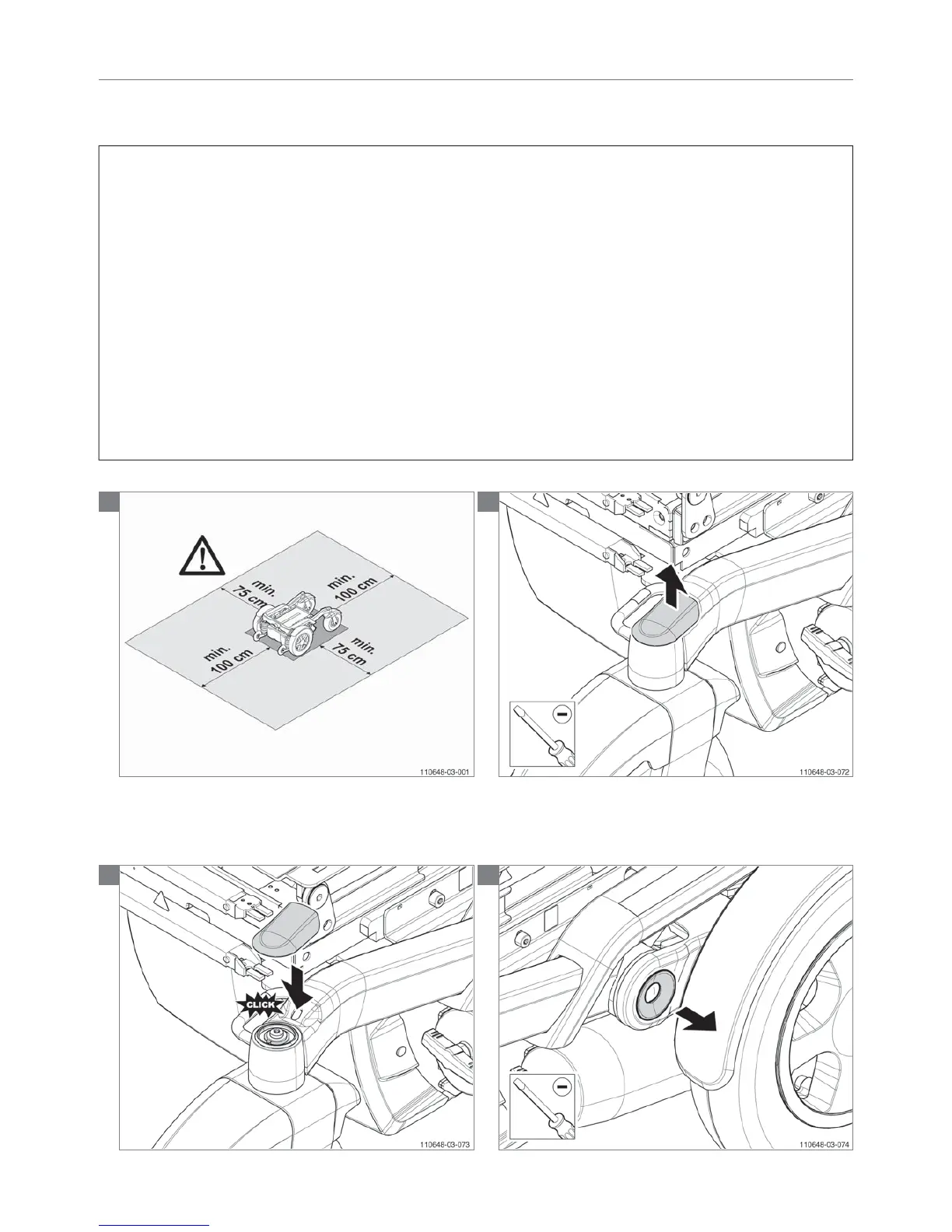
5.2.17 Replacing the coloured covers (not valid for Puma 20)
Ball head cover / Deco ring motor arm / Deco strip suspension bridge cover
Preparation
Switch off the wheelchair via the remote control.
Instructions
Ball head cover set:
• Take away the old cover and click back the new cover.
Deco ring motor arm set:
• Take away the old cover and click back the new cover.
Deco strip under the suspension bridge cover:
• Take away the old cover
• Click the new cover with turning movement back under
the suspension bridge cover.
Notice
Use a screwdriver in case you can’t get off the covers by
hand.
Relevant article numbers
9009748 Deco covers green
9009749 Deco covers blue
9009750 Deco covers orange
9009751 Deco covers silver
Tools used
Screwdriver
Icons
N.a.
1
Note! Suitable work area required!
2
3
4
92 | Service instructions Puma 20/40/6092 | Service instructions


 To Next Page