12
Discover EVOKE Flow EVOKE Flow Owner’s Manual v1.0
Stereo OutAux Speaker Aux In
6V DC
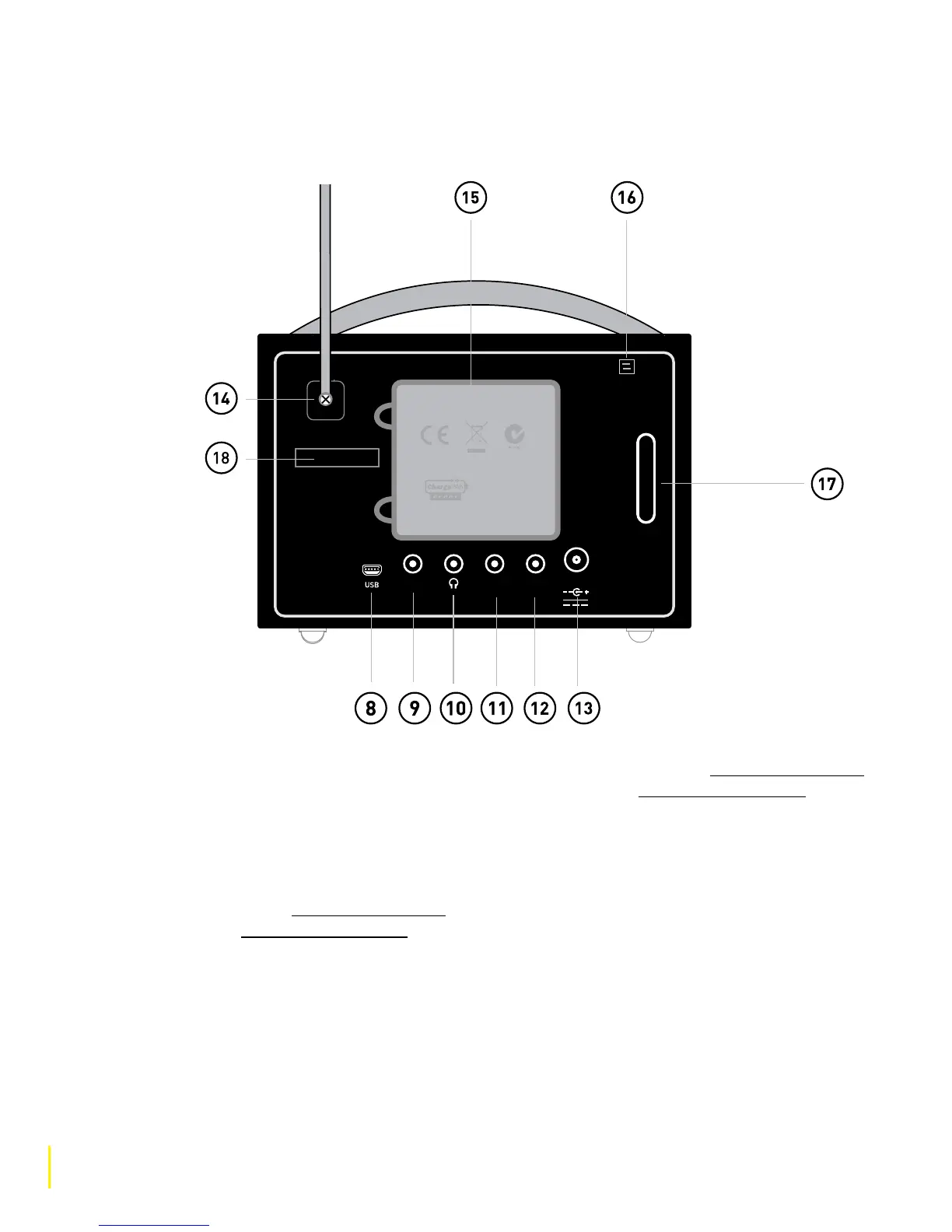
1.5 Quick guide to rear panel
8 USB connector (mini A to mini-B type)
for upgrading the radio’s firmware when
a wireless internet connection is not
available.
9 Input connection for the S-1 Flow auxiliary
speaker To purchase the S-1 Flow auxiliary
speaker, go to www.pure.com/shop or
contact your local PURE dealer.
10 Output connection for headphones
(3.5mm).
11 Output connection to an external amplifier
using a suitable 3.5mm-to-RCA cable (not
supplied).
12 Input connection for iPod, MP3 player, etc.
using a 3.5mm aux cable (not supplied) or
PURE i-10 (go to www.pure.com/shop or
contact your local PURE dealer).
13 6VDC input connection for supplied mains
adapter.
14 Screw to loosen and remove aerial if a
replacement is needed due to damage.
15 Compartment for ChargePAK E1
rechargeable battery (sold separately).
16 Clip to house aerial when not required (for
example, when listening to internet radio).
17 Acoustically tuned bass reflex port (do not
cover).
18 Serial number (needed for connecting your
radio at the Lounge).



 To Next Page