30
Listening to Media player EVOKE Flow Owner’s Manual v1.0
5 A list of media servers will be displayed. Highlight and select the name of your media server,
usually ‘Flowserver’ unless you have changed the default settings.
4.2 Playing albums, tracks and playlists
Your music files are grouped into folders organised by Flow Server or your UPnP media server, eg,
‘+Music’, ‘+All music’ or ‘+Albums’. You can browse through your music collection on EVOKE Flow’s
screen, and play tracks, albums and playlists..
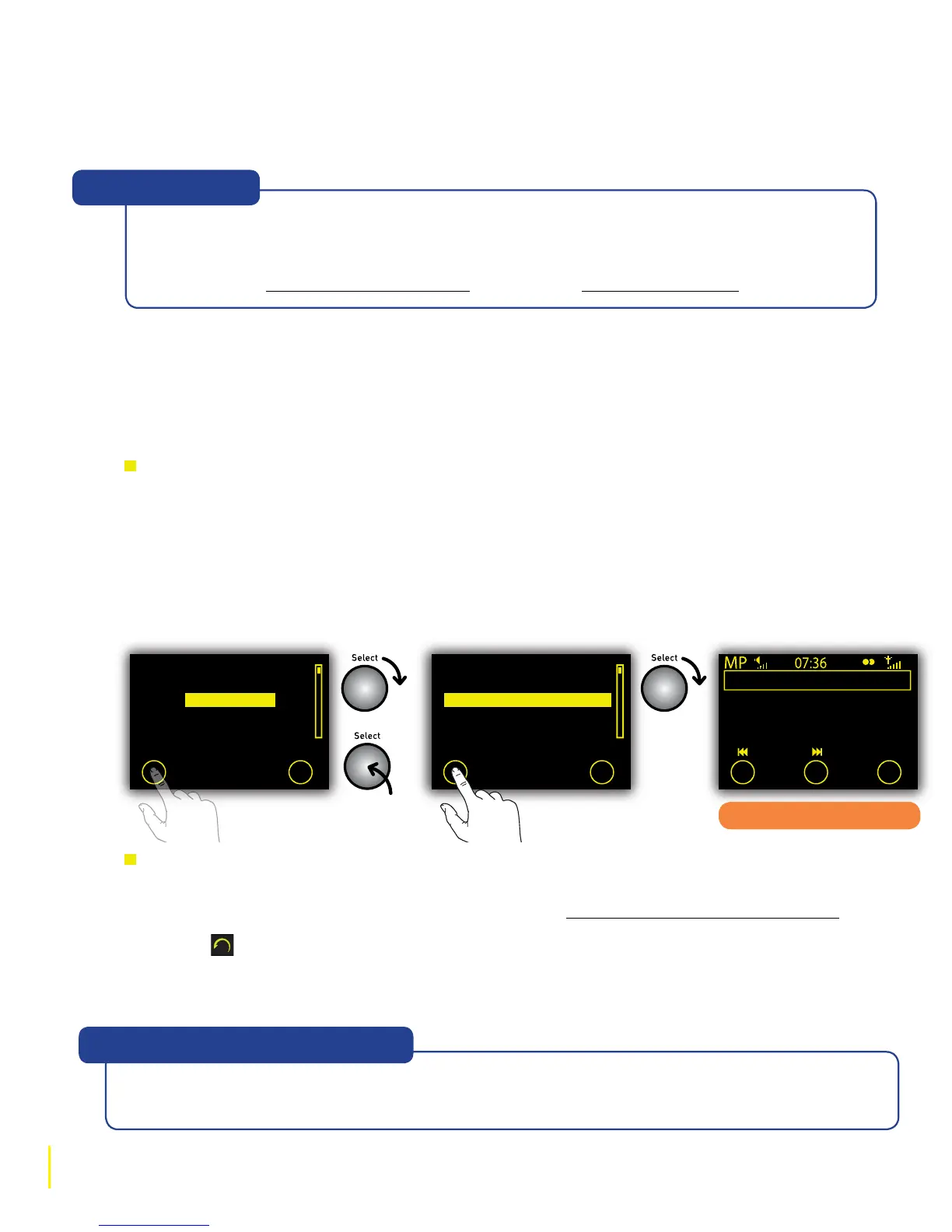
To play an album, folder or track
1 Highlight a top-level category in the media directory, eg, ‘+Artists’ or ‘+Albums’. Albums and
folders, which contain tracks or other folders, are always displayed with ‘+’ before their name.
2 Tap O Play if you want to play all of the tracks in the highlighted album or folder or push the
Select dial to view all the tracks inside the album or folder.
3 Highlight the track you want to listen to and tap O Play.
To select a new album, folder or track
1. From the track playing screen, rotate the Select dial to display the contents of the current
album, folder or playlist, or your search results (see Searching for an artist, track or album).
2. Tap
to go up to the current album or folder title or tap repeatedly to go back to the media
directory.
3. Highlight a new album, folder, playlist or track to play and tap O Play.
+Abba Gold
+Abbey Road
+Accelerate
+American Idiot
+Appetite for Destruction
Play Search
Playing a track
in an album
Supernatural Superserious
REM
Accelerate
Track 03
Options
If you see the message ‘No servers found’ tap O OK. Make sure that your PC is switched
on and Flow Server or another UPnP software programme is open and running. Tap
O Servers to re-scan for UPnP servers. If you still cannot locate Flow Server, please
read the ‘Help with Media Streaming’ section at the Lounge Help Centre.
“No servers found”
1. Living Well Is The Best
2. Man Sized Wreath
3. Supernatural Superse
4. Hollow Man
5. Houston
Play Search
The track playing screen
Most UPnP media servers have a directory called ‘+ All tracks’ or ‘+All Music’ that lists every
track on your PC. Select this directory to access and play all your music.
“Help! How do I see all my tracks?”



 To Next Page