14
Discover EVOKE Flow EVOKE Flow Owner’s Manual v1.0
1.8 Using Fast Scroll
Fast Scroll makes it quicker and easier to browse through large lists of radio stations, listen again
programmes and podcasts, which can sometimes be thousands of items in length.
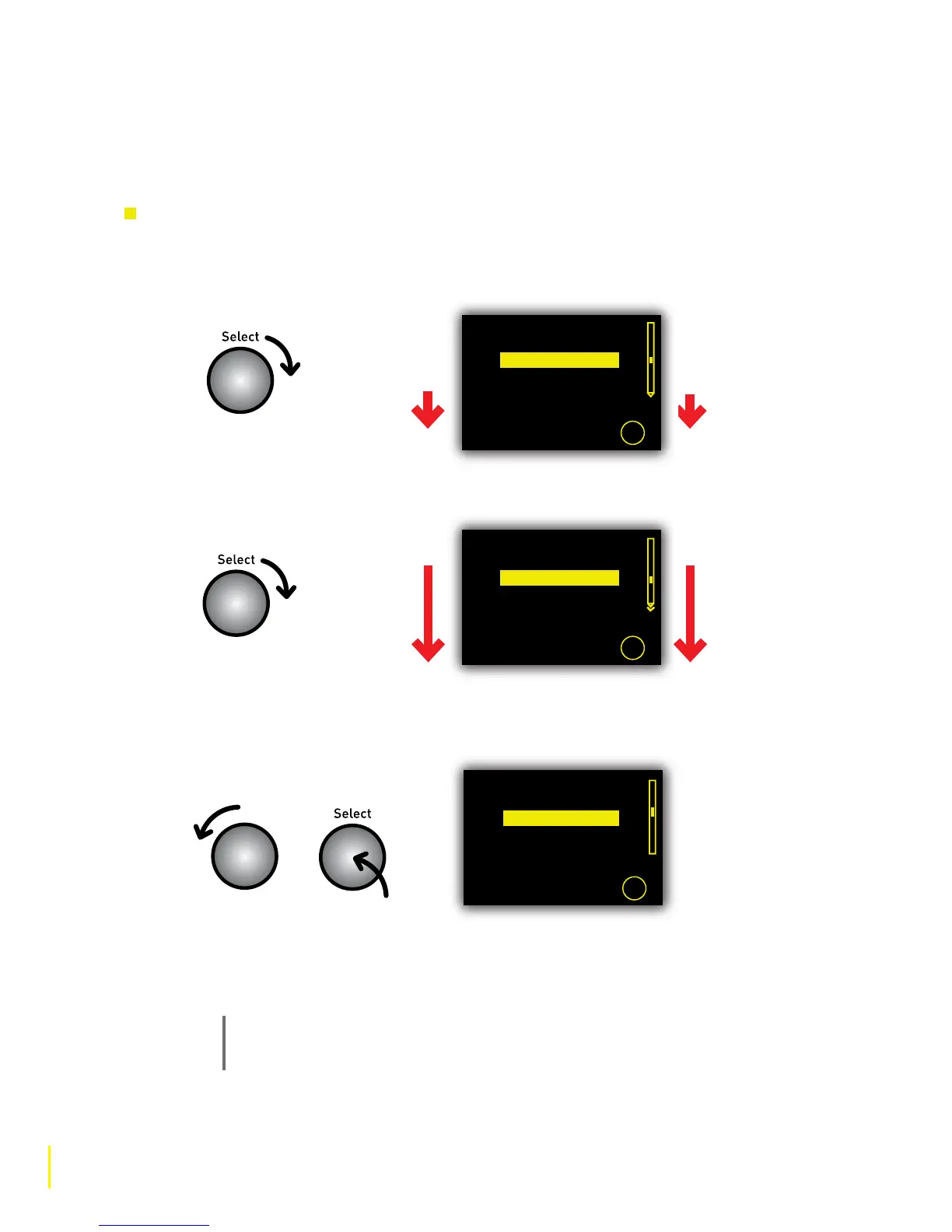
Using Fast Scroll to quickly scroll down a list of content
1 To start Fast Scroll quickly rotate the Select dial in the direction you want to scroll. The list will
begin to scroll slowly in the chosen direction as indicated by the arrows in the scroll bar.
2 Increase the scroll speed by rotating the Select dial in the direction of the scroll.
3 Spotted a station that looks interesting? Stop Fast Scroll by rotating the Select dial in the
opposite direction or pushing the Select dial.
4. Highlight and select the station you want to listen to or start Fast Scroll again as described
above. When you reach the end of a list Fast Scroll will ‘wrap around’ to the beginning again.
Note
When using Fast Scroll to browse a list of online audio content you may see the message
‘Loading...’ instead of the station name. This happens because the list is scrolling faster
than items can be collected over your wireless network.
Clube FM 100.5
Clubtec Radio
Clyde 1 102.5FM
Crazy House Radio
Europe 2 Rock Classics
Search
Search
Clube FM 100.5
Clubtec Radio
Clyde 1 102.5FM
Crazy House Radio
Europe 2 Rock Classics
Starting
Fast Scroll
Speeding up
Fast Scroll
Stopping
Fast Scroll
Rotate quickly
and sharply
Slow speed
Or
Faster speed
Clube 720 AM
Clube FM 100.5
Clubtec Radio
Clyde 1 102.5FM
Crik FM classic rock
Search



 To Next Page