17
Listening to DAB radio EVOKE Flow Owner’s Manual v1.0
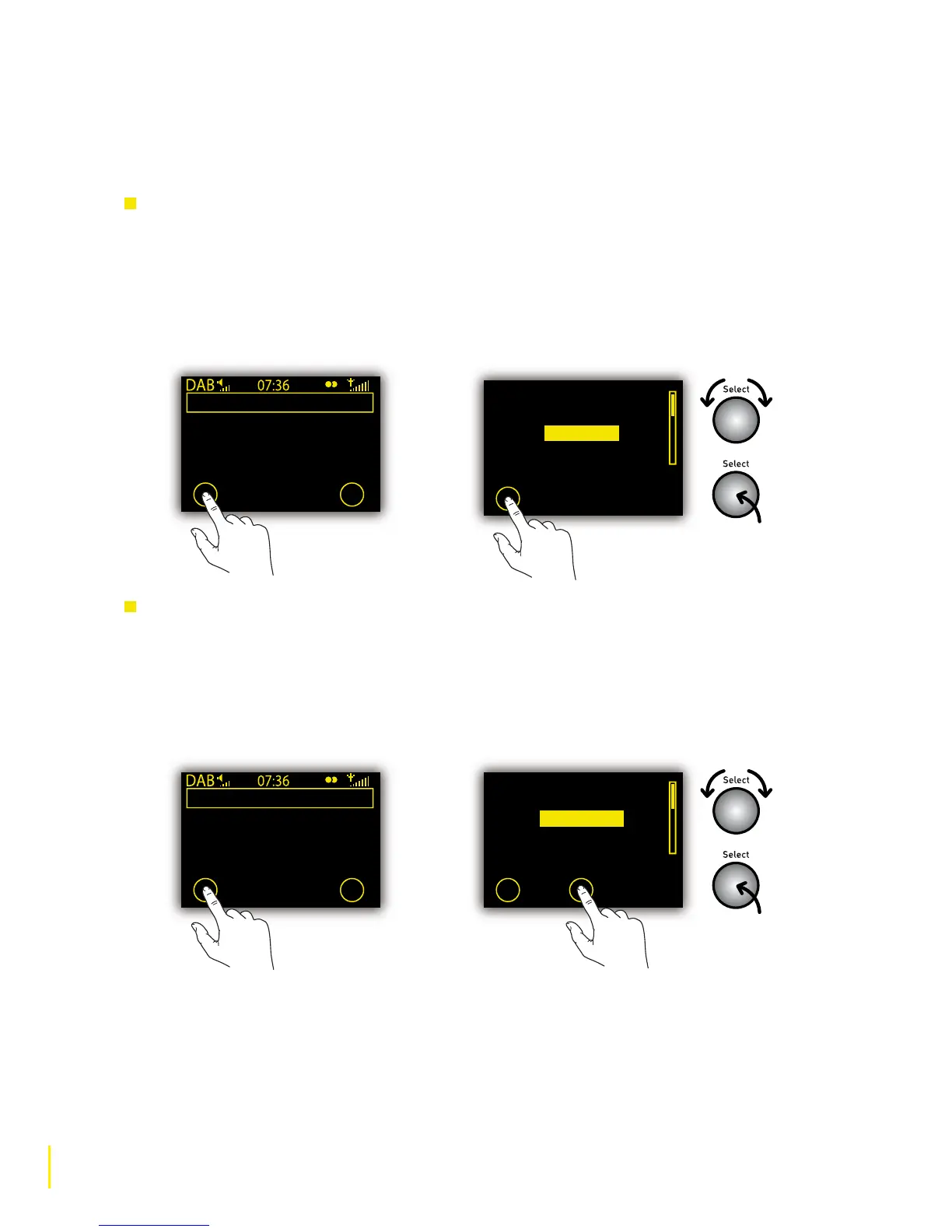
2.3 Using presets
You can store a list of preset DAB stations and update it as often as you like.
To store a DAB station as a preset
1 Select the DAB station you want to add to the preset list.
2 Tap O Presets.
3
Rotate the Select dial to highlight a preset slot between 1 and 30, for example ‘Empty 01’.
4 Tap O Store to store the station to the relevant slot on the preset list.
To select a station from the preset list:
1 When listening to a DAB station tap O Presets.
2 Highlight a preset slot between 1 and 30. Presets are labelled with the station name if a station
has been stored or ‘Empty...’ if nothing is stored.
3 Tap O Listen to tune in to the preset station (or push the Select dial).
Empty 29
Empty 30
Empty 01
Empty 02
Empty 03
Store
Empty 29
Empty 30
Planet Rock
Empty 02
Empty 03
Store Listen
Storing a
preset station
Selecting a
preset station
BBC Radio 4
Missed an item? You can
listen to the program again
via our website
Presets Options



 To Next Page