OPER
ATING MANUAL FOR SELECT ANALYST
Issue: A, part number R041118
31
9.4.2 Wall mounting
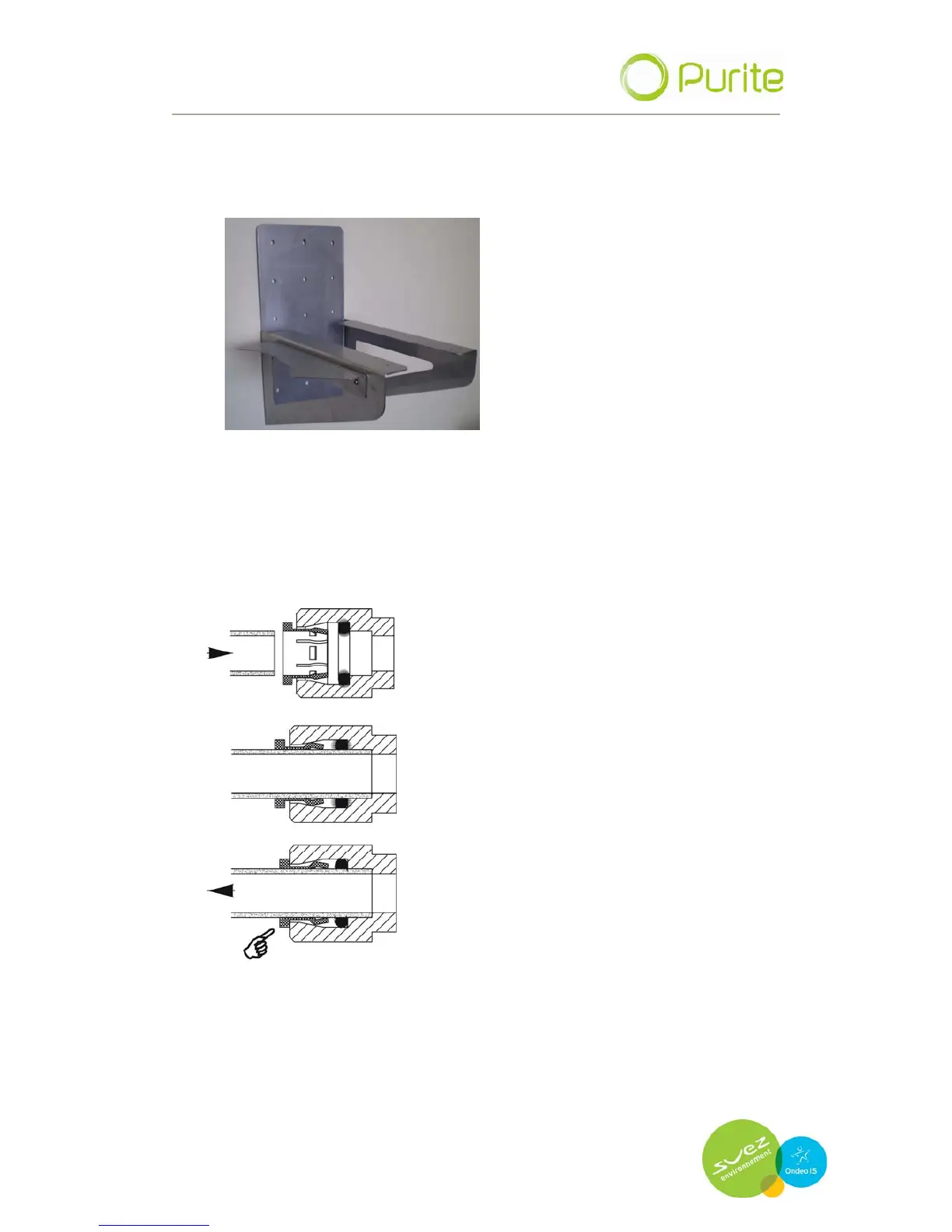
Use a wall mount bracket (Part Number L300900 shown below)
Secure the bracket to a suitable wall. Careful consideration should be
given to the strength and suitability of the wall as the working weight of
the select Analyst is 50Kg.
Secure the bracket to the wall. Remove the feet of the Analyst by
unscrewing them. Place the Analyst on the wall bracket and fix to the
bracket using screws through the feet mounting points.
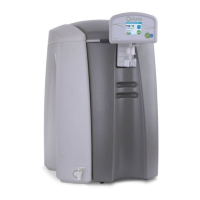
All hoses are connected to the unit via its push
fit connectors. To make a connection, the hose
is simply pushed in by hand; the unique
patented locking system then holds the tube
firmly in place without deforming it or restricting
flow.
Cut the tube square and push in until the tube
stops.
Ensure the tube is pushed into the tube stop,
securing tube in position.
To remove tubing push collet against body and
slide tube out of fitting
Water Inlet connection:
Fit 8mm tubing to the water inlet connector found on the rear of the
unit and the other end to your water supply.


 To Next Page