www.PyleUSA.com
17
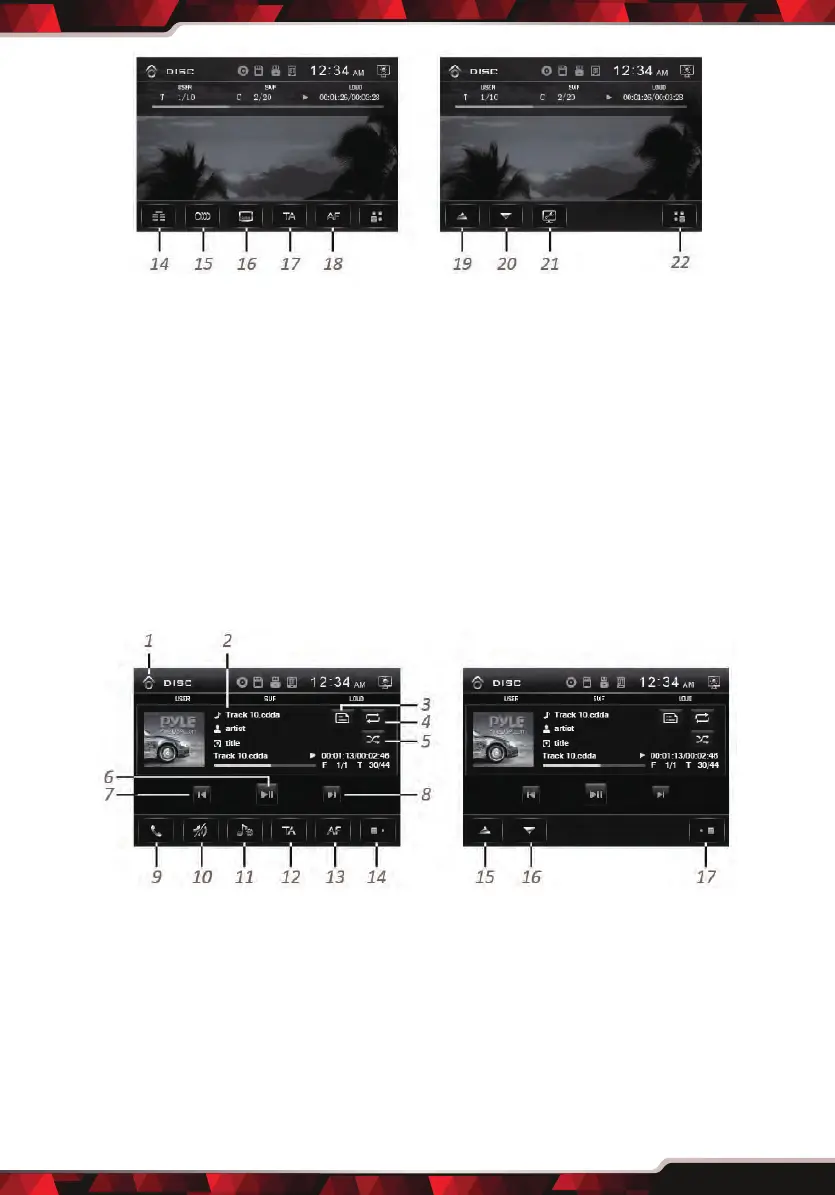
1. Home Page
2. Information Display
3. Shortcuts for switch BT
(Bluetooth) mode
4. Mute On/o
5. Previous Track / Fast backward
6. Play/Pause
7. Next Track / Fast foward
8. Next Page
9. Stop Playback
10. Goto(Video Search)
11. Repeat Play
• CD, CD-R/CD-RW/ MP3 Disc Playback:
1. Home Page
2. Information Display
3. File/Folder list
4. Repeat Play
5. Random Play
6. Play/Pause
7. Previous Track/ Fast backward
8. Next Track / Fast foward
9. Shortcuts for switch BT
(Bluetooth) mode
12. Random Play
13. Menu
14. Title
15. Multi-Audio Language
16. Multi-Subtitle Language
17. TA(Trac Announcement)
18. AF(Alternative Frequencies)
19. Tilt up monitor
20.Tilt down monitor
21. Video parameter (Adjust Brightness,
Contrast, Hue, Saturation, Shapness)
22. Previous Page
10. Mute On/o
11. EQ Setting
12. TA(Trac Announcement)
13. AF(Alternative Frequencies)
14. Next Page
15. Tilt up monitor
16.Tilt down monitor
17. Previous Page



 To Next Page