31
TD-001578-01-C
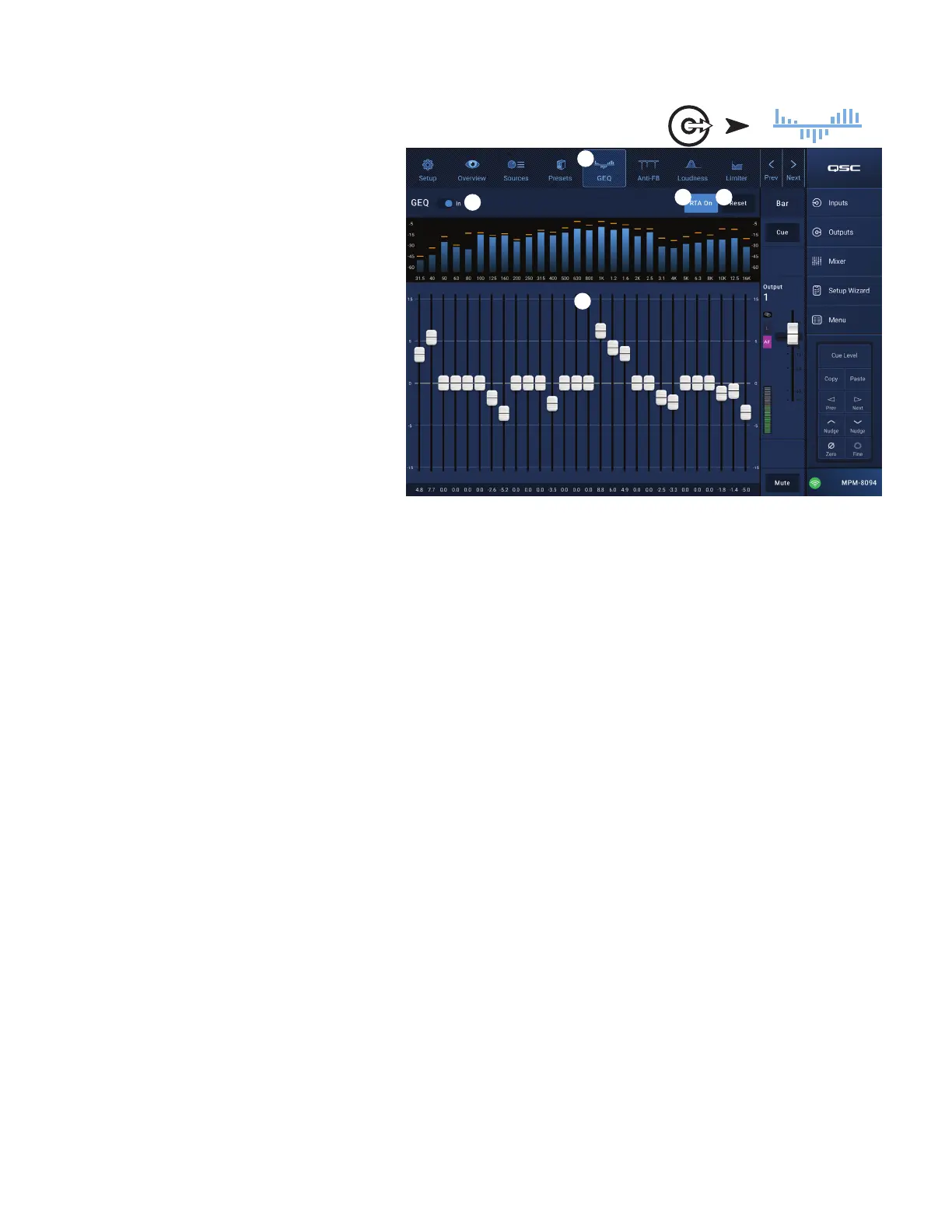
Output Zone − Graphic Equalizer (GEQ)
Each output includes a 1/3 octave graphic equalizer (GEQ)
that may be used to adjust the tonal balance of the output.
1.
GEQ
button – Touch to access the GEQ.
2.
Graphic Equalizer In
switch – Engages / disengages
the GEQ.
3.
RTA On
button – Touch to activate / deactivate a Real
Time Analyzer display for the output. When the RTA
is not enabled, the GEQ screen is enlarged to occupy
both the RTA and GEQ screen area.
4.
Reset
– Sets all GEQ faders to 0 (flat).
5.
GEQ Band
sliders – Touch and drag a slider to change
the amplitude of the selected frequency band. Use the
Nudge buttons and Fine button for greater precision.
Touch
Outputs
Touch GEQ
3 4
1
5
2



 To Next Page