119
DEVELOPING RAW DATA INSIDE THE CAMERA
It is possible to develop RAW data inside the camera, and create a JPEG
format image.
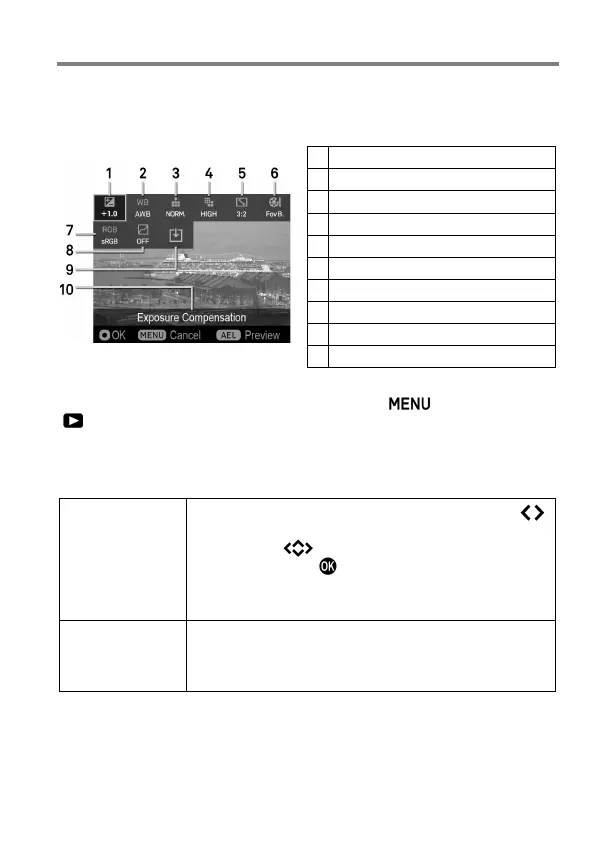
RAW development setting screen
Exposure Compensation (P. 78)
Icon to start image development
Description of selected icon
1
While displaying the RAW image, press the button and open
[ Playback Menu] (P. 28 ), then select [RAW Development].
2
In the sub menu, select the image to develop in RAW format from the
following two methods;
Select Files
Display the picture to develop by pressing the
buttons (when it is displaying 9 pictures over the
screen, the butto
n will appear instead), and
confirm it with the button.
It is possible to process [Selecting File] even when
an image is not displayed in Step
1
.
Current File
It displays the image selected at the Step
1
.
It is not possible to select [Current File
] when
JPEG images are selected at the Step
1
.
After selecting the image, the message [Now Processing…] will appear
until it displays the RAW development setting screen.



 To Next Page