EasyManua.ls Logo

Quattro dp0 - Color LCD Monitor Indication; Understanding Shooting Icons

Default Icon
146 pages
Print Icon
To Next Page IconTo Next Page
To Previous Page IconTo Previous Page
Loading...
14
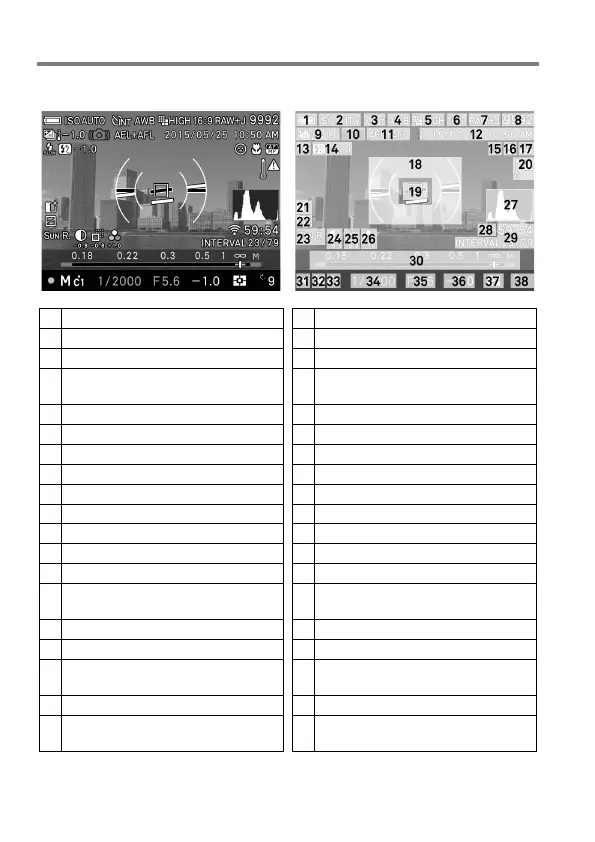
COLOR LCD MONITOR INDICATION
Explanation of the icons displayed in still image shooting.
1
Battery Level Indicator
20
Temperature rise caution mark
2
ISO Sensitivity
21
Overexposure Correction *
3
Drive Mode
22
Tone Control
4
White Balance
(Filtering Effect)
23
Color Mode
(Toning Effect)
5
Image Size
24
Contrast *
6
Aspect Ratio
25
Sharpness *
7
Image Quality
26
Saturation *
8
Number of shots remaining
27
Histogram *
9
Auto Bracket *
28
Eye-Fi Communication Icon *
10
Camera Shake Warning
29
Interval timer *
11
AE Lock *
30
Scale Bar *
12
Date / Time *
31
Focus Indicator
13
Flash Mode *
32
Exposure Mode
14
Flash Exposure Compensation
value *
33
Custom Mode *
15
Face detection AF *
34
Shutter Speed
16
AF Limit Mode *
35
F Number
17
Focus Mode *
36
Exposure
Compensation
Value
/
Exposure Meter
18
Electronic Level *
37
Metering Mode
19
Focusing Frame
38
Number of shots remaining
before memory buffer full
* Displayed only during setting.

Table of Contents