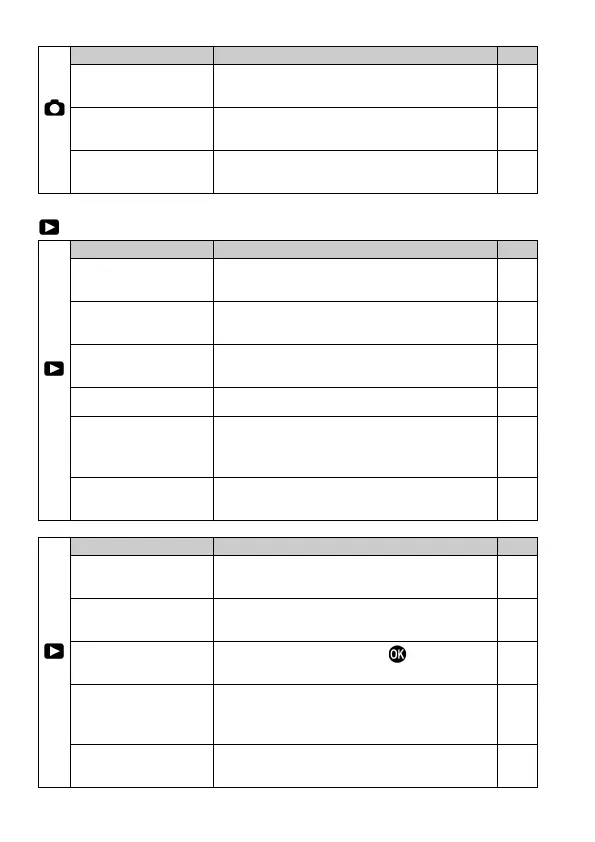
32
(5)
AF Limit Mode
Set whether or not the AF Limit Mode is
added to the Focus Mode button.
53
Speed Priority AF
Sets the AF mode between Normal AF
mode or Speed Priority AF mode.
56
Face Detection AF
Select normal AF Mode or Face detection
AF Mode.
55
PLAYBACK MENU
(1)
Lock
Lock the image, or unlock the locked
image.
106
Mark
Mark the image, or unmark the marked
image.
108
Rotate
Rotate the image to the desired position
for display.
110
Slideshow
Start the slideshow (playback images
automatically) or change the slideshow
116
DPOF
Select the images and set the quantity
for printing.
118
(2)
It develops JPEG format images from
RAW files.
119
Sets whether or not the over-exposure
warning is shown on images.
112
Sets the function that the
button will
perform during image review.
113
Image Rotation
Sets whether or not vertically orientated
images are automatically rotated and
Sound Memo
Sets or cancels the Sound Memo, which
can be recorded to a stored image.
114



 To Next Page