65
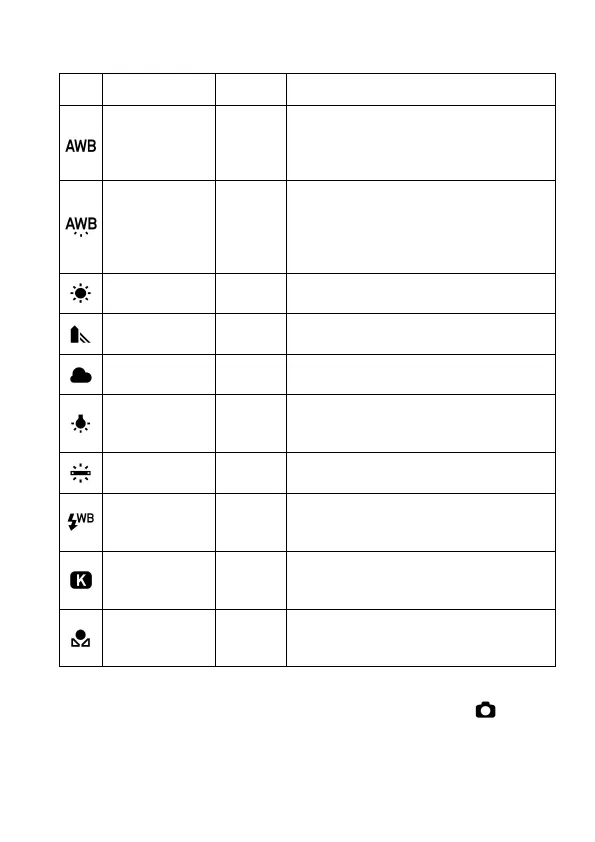
WHITE BALANCE OPTIONS
OPTION
DESCRIPTION
Auto (Default)
-
Select this setting to allow the camera
to automatically determine the
appropriate white balance
Auto
(Lighting
Source Priority)
-
Select this setting to allow the camera
to automatically determine the
appropriate white balance while
valuing the color and atmosphere of
Daylight
Select this setting when taking pictures
in full sunlight.
Shade
Select this setting when taking pictures
in the shade under sunny skies.
Overcast
Select this setting when taking pictures
under cloudy, overcast skies.
Incandescent
Approx.
3000 K
Select this setting when taking pictures
indoors under incandescent (tungsten)
Fluorescent
Select this setting when taking pictures
indoors under fluorescent lighting.
Flash
Approx.
7000 K
Select this setting when taking pictures
with the Sigma EF-610 DG SUPER /
Color
Temperature
-
Select this setting to adjust the white
balance by setting color temperature in
numerical value.
Custom
-
Select this setting to determine the
white balance based on the image
The White Balance can be set in Quick Set Menu ( P.3 5) or [ Capture
Settings] (P. 2 8 ) → [White Balance].



 To Next Page