GNSS Module Series
L89 EVB User Guide
L89_EVB_User_Guide 18 / 26
4.2.2. Firmware Downloading in Boot Download Mode
Steps of firmware downloading in boot download mode are as follows:
Step 1: Connect the EVB to a PC by using the USB cable.
Step 2: Long press DL button (the 3D-FIX/BOOT pin of L89 will be pulled up to connect the VCC pin by
using a 10kΩ resistor), and switch POWER pin to ON state to power on the EVB. Once the high
voltage level of 3D-FIX/BOOT pin has been detected during power-up, the module will enter
bootloader download mode.
Step 3: Release DL button to enable 3D-FIX/BOOT pin of L89 to return to normal floating.
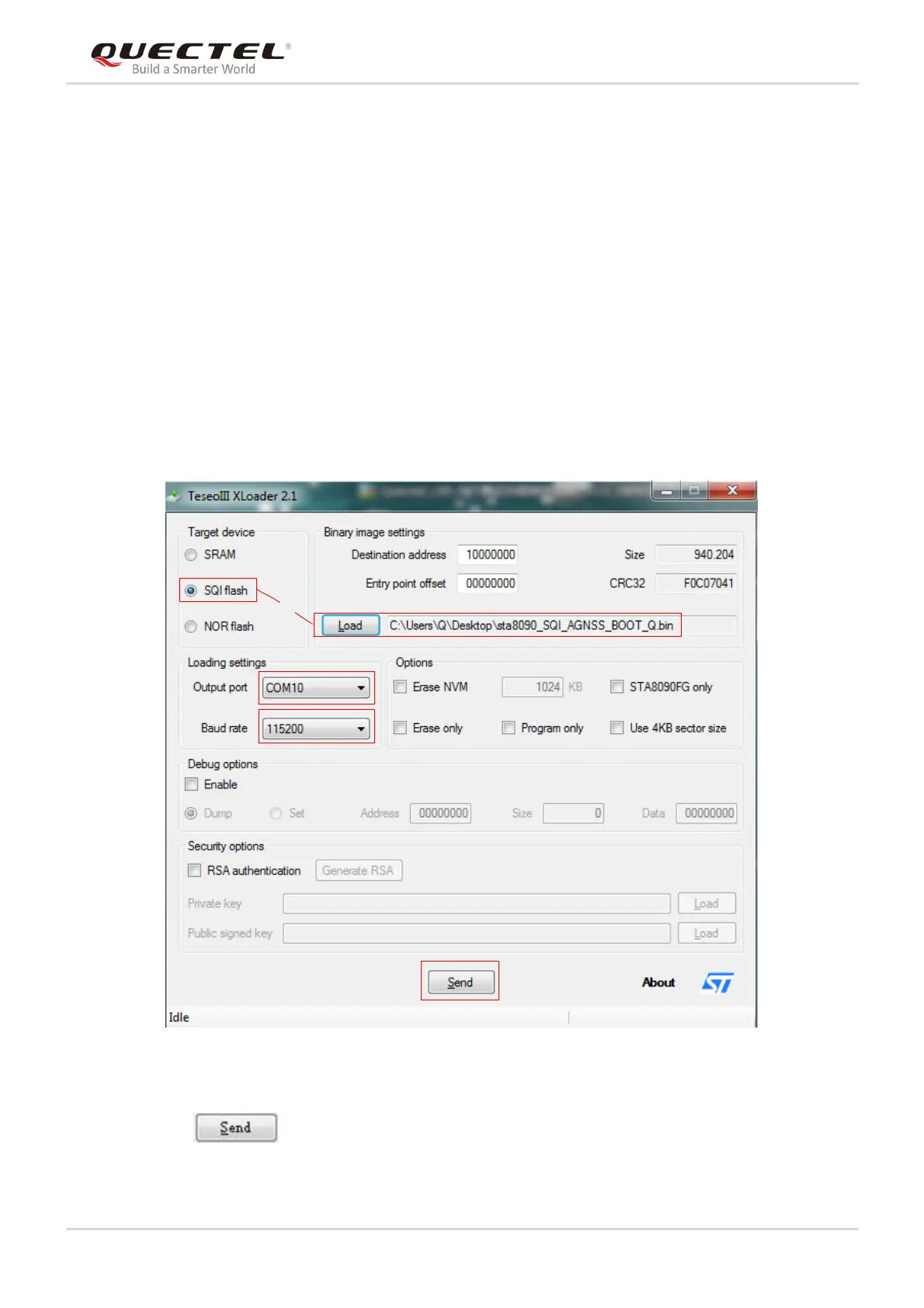
Step 4: Run the TeseoIII XLoader tool and configure the tool as shown below.
Figure 12: TeseoIII XLoader Tool Configurations for Firmware Upgrade
Step 5: Click button to upgrade the module.



 To Next Page