GNSS Module Series
L89 EVB User Guide
L89_EVB_User_Guide 17 / 26
4.2. Firmware Downloading
L89 module supports the firmware downloading in both normal working mode and boot download mode
by using the tools of STA808x/9x Firmware Upgrade and TeseoIII XLoader respectively.
4.2.1. Firmware Downloading in Normal Working Mode
Steps of firmware downloading in normal working mode are as follows:
Step 1: Connect the EVB to a PC by using the USB cable.
Step 2: Switch the POWER pin to ON state to power on the EVB.
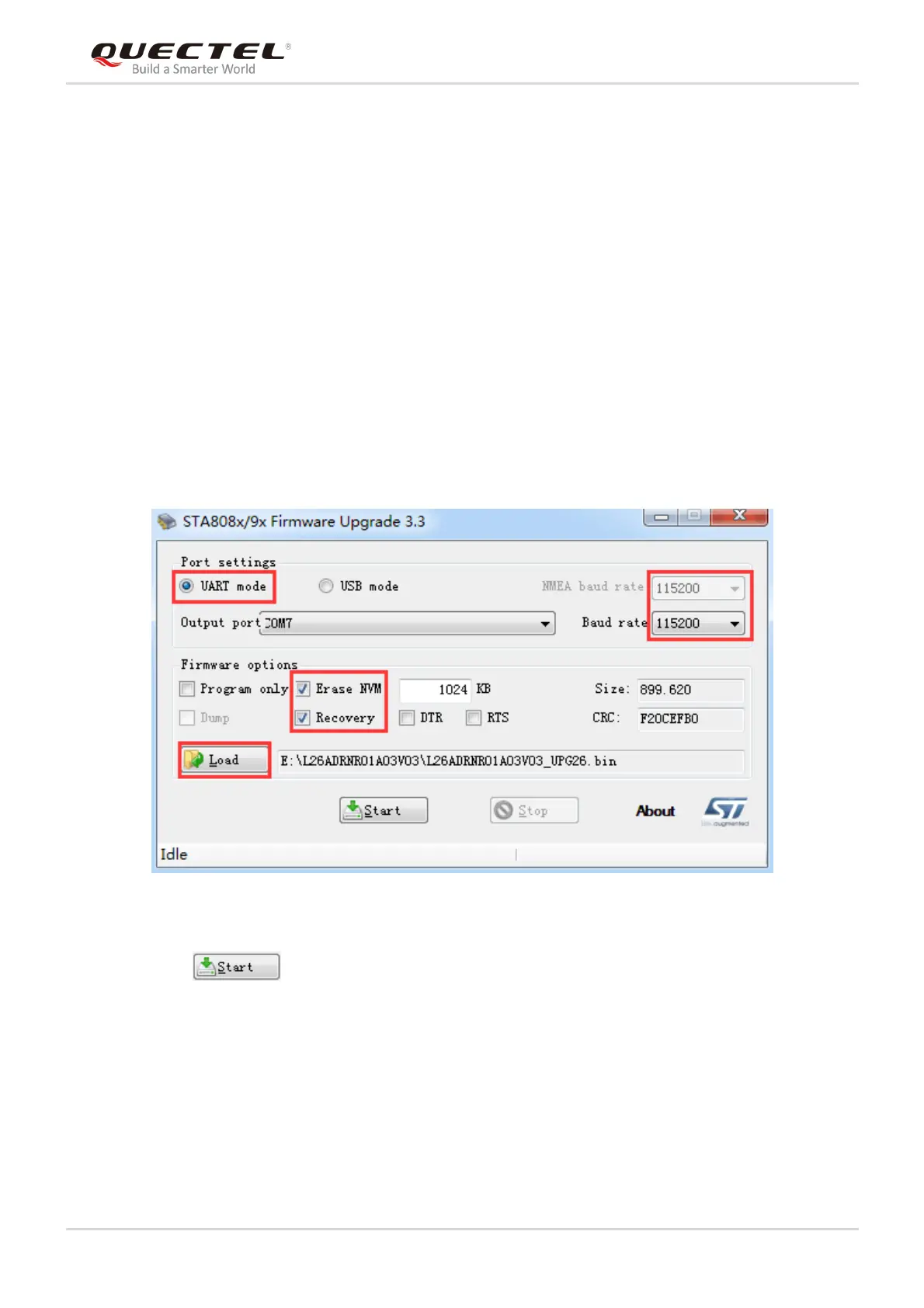
Step 3: Run the STA808x/9x Firmware Upgrade Tool and configure the tool as shown below.
Figure 11: STA808x/9x Firmware Upgrade Tool Configurations for Firmware Upgrade
Step 4: Click button and then reset the module to upgrade the firmware.



 To Next Page