ENGLISH
24
Attitude Power Rev.1.0
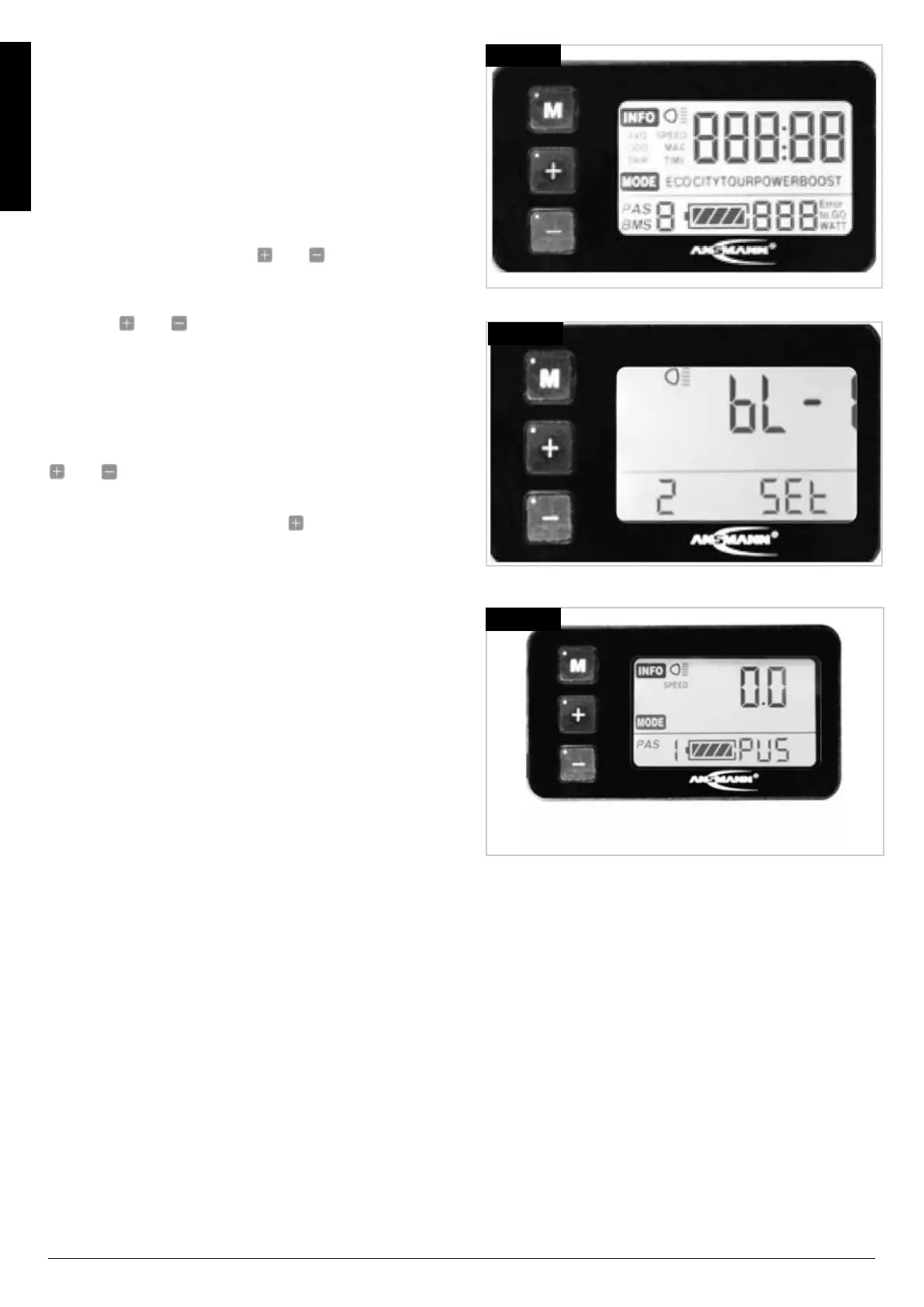
Initial Start-up Display:
At start-up, the screen displays all functions to confirm
that the associated LCD Icon is working, (Fig.3.4).
Back-light brightness:
NOTE:
bL - n = Backlight Brightness then a number.
Setting Back-light Brightness
On the display, hold down the
and buttons
simultaneously for Three seconds toenter the Setup
Menu. The display shows as Fig.3.7.
Here you can select the level of backlight in 3 steps.
Using the and buttons you can select the
brightness of your backlight. Press the M button to
confirm your selection. You will automatically continue to
the next menu after confirming, (Fig.3.7).
Using The Display:
There are 6 levels of support, that are set by using the
and buttons. Support level "0" means that the
drive system is operating, but the motor delevers no
support.
To activate motor assist, press the button and select
the desired speed, (Fig.3.8).
• Level 1 ≈ 0 kp/h
• Level 2 ≈ 6 kp/h
• Level 3 ≈ 6 kp/h
• Level 4 ≈ 6 kp/h
• Level 5 ≈ 15 kp/h
• Level 6 ≈ 23 kp/h
Fig.3.4
Fig.3.7
Fig.3.8



 To Next Page