19
Selecting Watch Points
Once youve decided how your system will respond to watched
points (see Selecting Watch Tone), you need to decide which of the
points in your system are to be watched. Use this feature to tell
your system which points to watch. You cannot watch fire points.
Choosing which points to watch depends upon your goals. If
you have small children, you may choose to watch points of entry
and exit. Each time a watch point is faulted (door or window is
opened) the keypad responds as programmed. For example, you
may tell your system to produce a short beep when a watch point is
faulted (see Selecting Watch Tone).
1. Make sure that your system is off (On light is off).
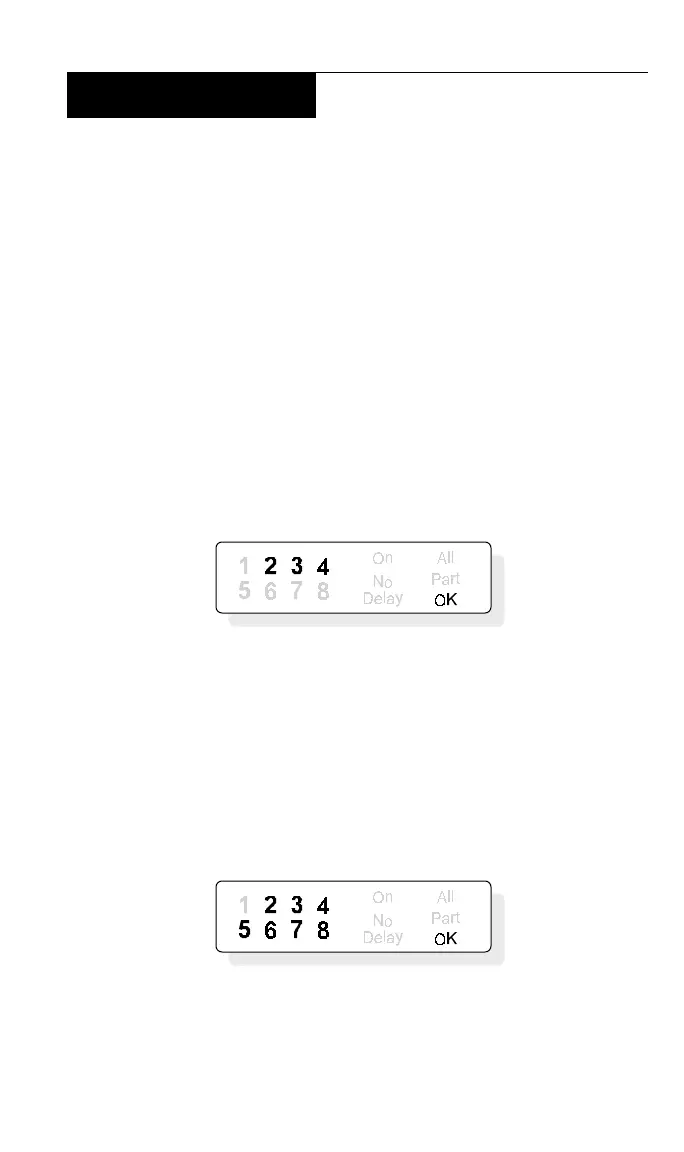
2. Press the 8 key. The display shows all of the points that are
currently being watched. In this example, points 2, 3, and 4 are
currently watched points:
3. To select or deselect watched points, you must enter your
passcode (Owner Type required) after pressing the 8 key (Step 2).
4. You may select and deselect watch points by pressing keys.
Key 1 for point 1 and so on. To select or deselect all points, press
9.
5. For instance, you could press keys 5, 6, 7, and 8, making
them watch points. The display would show:
6. You may continue to select or deselect as many watch points
as are available. When you are finished, press the CLEAR key to
return to the off display.



 To Next Page