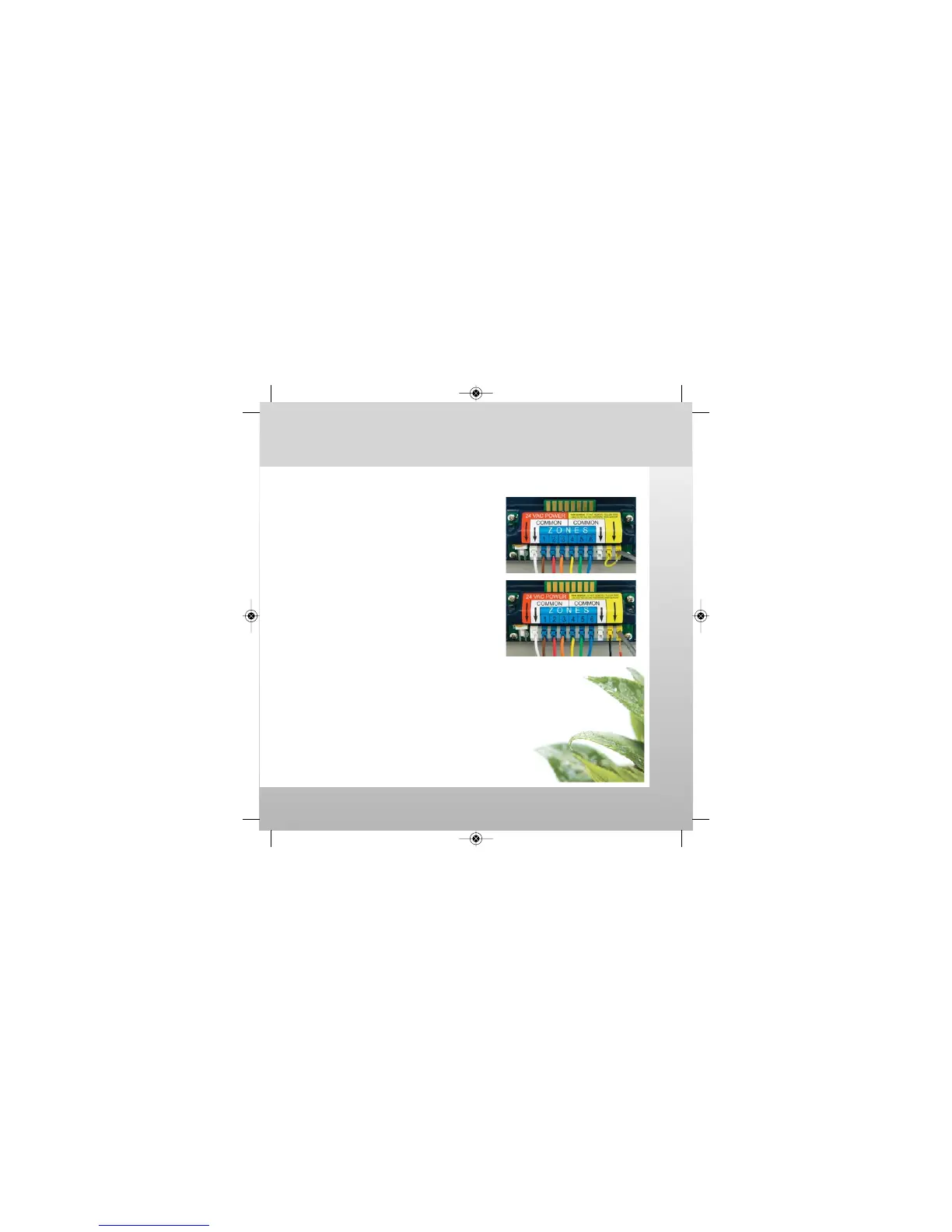
Connect a conventional two wire rain sensor / switch.
1. Mount rain sensor per the manufacturer's
installation instructions.
2. Remove rain sensor jumper wire.
-Press square plunger down.
-Remove yellow jumper wire.
3. Connect wires from rain sensor to terminal strip.
-Press square plunger down.
-Insert sensor wires into yellow terminal blocks
(ignore color of sensor wires).
NOTE: The controller cannot send a watering signal to valve
solenoids if the jumper wire is removed and a rain sensor is not
connected. Actual watering will not occur.
Rain Sensor / Switch is ready for use.
Examples of compatible Rain Sensor / Switch:
• Nelson
®
8501 Rain-Trip
™
• Rainbird
®
RSD-CEx
• Hunter
®
Mini-Clik
®
• Hunter
®
Rain-Clik
™
• Toro
®
TRS
Rain Sensor / Switch
watch the video at raindrip.com/smart
Installation & Programming
20
SmrtCntrl_InstlltnPrgrmng_Bklt 3/31/09 4:57 PM Page 20


 To Next Page