Home
RainPoint
Timer
TTV102B
Page 20 (Set Watering Schedules)
RainPoint TTV102B - Set Watering Schedules
29 pages
Manual
Save Page as PDF
To Next Page
To Next Page
To Previous Page
To Previous Page
Loading...
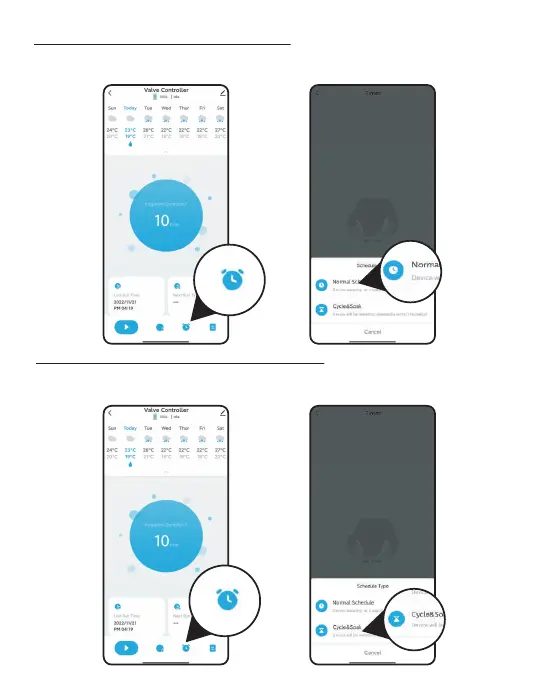
How to set the Normal Schedule ?
1. Click to enter the setting Normal Schedule.
2. T
ap to enter the Normal Schedule.
How to set the C
ycle&Soak Schedule ?
1. Click to enter the setting C
ycle&Soak Schedule.
2. Select Cycle&Soak
watering mode.
- 17 -
19
21
Table of Contents
Main Page
Table of Contents
3
Introduction
4
Contents in the Box
4
Product Overview
4
Produce Specifications
4
Installation
5
Install App on Your Phone
5
Pair the Irrigation Gateway
5
Connect the Bluetooth Irrigation Timer
9
Add Bluetooth Irrigation Timer to Irrigationgateway
11
Install the Bluetooth Water Timer
12
Test before Use
13
App Programming
14
App Home Screen
14
Bluetooth Irrigation Timer
15
Manual Watering
17
Manual Irrigation Duration
18
Manual Rain Delay
19
How to Set the Normal Schedule
20
How to Set the Cycle&Soak Schedule
20
Smart Automation
21
Automation & Tap-To-Run
21
Steps to Set Automation or Tap-To-Run
22
Home Management
23
Reset the Device
24
Trouble Shooting
25
Warnings & Warranty
27
Fcc Notice
28
Customer Service
29
Related product manuals
RainPoint TWG009BW
29 pages
RainPoint ITV201P
56 pages
RainPoint ITV101P
23 pages
RainPoint ITV205
44 pages
RainPoint ITV105
40 pages
RainPoint HTV213FRF
22 pages
RainPoint HTV113FRF
21 pages
RainPoint ITV517
45 pages



 To Next Page