EasyManua.ls Logo

RainPoint ITV105 - User Manual

RainPoint ITV105
40 pages
Print Icon
To Next Page IconTo Next Page
Loading...
USER MANUAL
Model: ITV105
English Español
Email
seice@rainpointus.com
WhatsApp
+1 626-780-5952
Free Hotline
US: 1-833-381-5659 (EN)
EU: +44 800-808-5337 (EN DE)
Save the user manual for future reference
If you have any questions, please contact us to get suppo

Other manuals for RainPoint ITV105

Questions and Answers

Summary

Warm Tips Before Using

Temperature Guidelines

Do not use the water timer below 37°F (3°C) to avoid freezing damage.

Filter Maintenance

Clean the filter regularly to prevent clogging from dirt particles.

Battery Usage Recommendations

Use 2 new AAA alkaline batteries; do not mix new/old or different types.

Activation Requirement

Activate the timer before first use or after inactivity, refer to page 6.

Water Type

Only use with clean cold water.

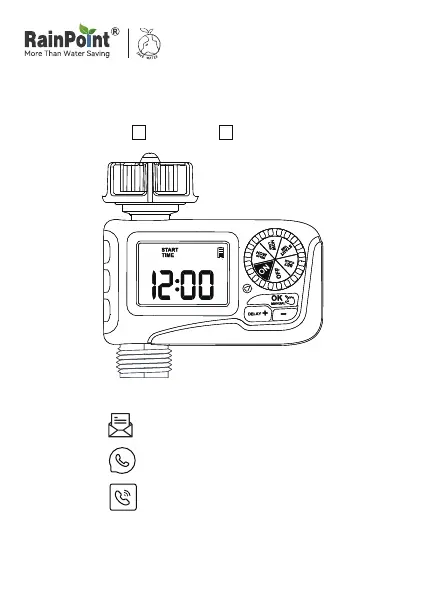
Product Overview At A Glance

Dial Functionality

Rotate the dial to customize your watering schedule.

OK;MANUAL Button Function

Use OK to confirm time, hold MANUAL to water manually.

DELAY;+ Button Function

Use + to adjust time, hold DELAY to activate Rain Delay.

- Button Function

Use - to adjust the time.

Specifications

Dial Position Functions

Details functions for SET CLOCK, START TIME, HOW LONG, HOW OFTEN, ON, and OFF dial positions.

Technical Specifications

Lists pressure, flow rate, waterproofing, temperature, inlet/outlet, and power requirements.

Product Installation: Installing Batteries

Battery Installation Steps

Steps to remove cover, insert 2 new AAA batteries, and replace cover securely.

Battery Notes and Care

Secure cover for waterproofing, remove batteries for long storage, replace low battery indicator.

Product Installation: Installing the Timer

Timer Attachment Steps

Steps for turning off faucet, wrapping Teflon tape, screwing timer, and attaching hose.

Installation Tips and Notes

Use Teflon tape for tight connections, install by hand, remove for freezing temps.

Activate Timer Before Use

Activation Procedure

Steps to activate the device, including setting dial to ON and running manual watering.

Activation Testing and Troubleshooting

Test water flow by repeating activation steps, contact support if issues arise.

Programming Step 1: Set Clock

Setting Current Time

Turn dial to SET CLOCK, use +/- to set time, OK to confirm, turn dial to save.

Programming Step 2: Start Time

Setting Watering Start Time

Turn dial to START TIME, use +/- to set desired start time, OK to switch hours/minutes.

Programming Step 3: How Long

Setting Watering Duration

Turn dial to HOW LONG, use +/- to set duration from 1 min to 3 hrs 59 mins, OK to switch hours/minutes.

Programming Step 4: How Often

Setting Watering Frequency

Turn dial to HOW OFTEN, use +/- to set frequency (1-12 hours or 1-7 days).

Watering Frequency Examples

Illustrates watering schedules for every 1, 2, or 3 days.

Programming Step 5: Automatic Watering

Activating Automatic Watering

Turn dial to ON; LCD displays current and next watering start times.

Programming Confirmation

Timer is programmed successfully and will water based on set parameters.

Additional Functions: Rain Delay

Setting Rain Delay Period

Turn dial to ON, press DELAY for 3-5s to choose 24/48/72H delay with +/- buttons.

Activating and Removing Rain Delay

Press OK to activate delay; hold DELAY again to resume schedule. Note confirmation required.

Manual; Hand Watering

Initiating Manual Watering

Turn dial to ON, press MANUAL for 3-5s, use +/- to set time (1 min to 8 hrs), press OK to start.

Stopping Manual Watering

Hold MANUAL to exit or turn dial to OFF. Remember to turn dial back to ON to resume schedule.

Off Mode

Stopping Watering Plan

Turn dial to OFF to stop automatic watering. Settings are saved.

Battery Status Indicator

Understanding Battery Levels

Display shows 'Full' or 'Low Power'. Replace batteries when low to prevent operation interruption.

Troubleshooting Guide

Water Inlet Leakage Solutions

Check filter placement, faucet compatibility, and use Teflon tape for sealing.

Water Flow and Valve Issues

Address inactive valve due to storage or blockage by running manual watering cycles.

Manual;Rain Delay Function Issues

Ensure OK button is pressed after setting time to save and run the function.

Short Battery Life Causes

Avoid mixing old/new or using carbon/rechargeable batteries; use new alkaline ones.

Troubleshooting Guide (Continued)

Low Water Pressure Solutions

Check for filter blockage, ensure proper timer installation, or consider a pressure booster.

No Display Troubleshooting

Replace exhausted batteries and avoid direct sunlight exposure on the display.

Cleaning Your Timer

Filter Cleaning Procedure

Turn off faucet, remove timer, check and rinse filter with running water if dirty.

Valve and Pipe Cleaning

Turn on Manual Watering Mode to check valve operation and clean pipe gently if blocked.

Warnings and Precautions

Usage Environment and Safety

For outdoor use only; store indoors when not in use. Avoid extreme temperatures and direct water spray.

Installation and Handling Safety

Tighten without tools, ensure filter is horizontal, handle with care to avoid damage or shock.

Product Compliance and Disposal

Product made in China, conforms to standards. Dispose of properly according to national requirements.

Warranty Information

Warranty Coverage and Claims

1-year warranty against manufacturing defects. Contact service@rainpointus.com for requests.

Customer Service and Support

Setup Assistance and Resources

Search YouTube for 'RainPoint' videos. Contact before returning product; provide LOT NO.

Contact Channels for Support

Provides US/UK hotlines, email, and WhatsApp for assistance.

RainPoint ITV105 Specifications

General IconGeneral
ModelITV105
Power Supply2 AA batteries (not included)
MaterialPlastic
ControlApp control
Weather AdjustmentYes
Watering Duration1 minute to 360 minutes

Related product manuals