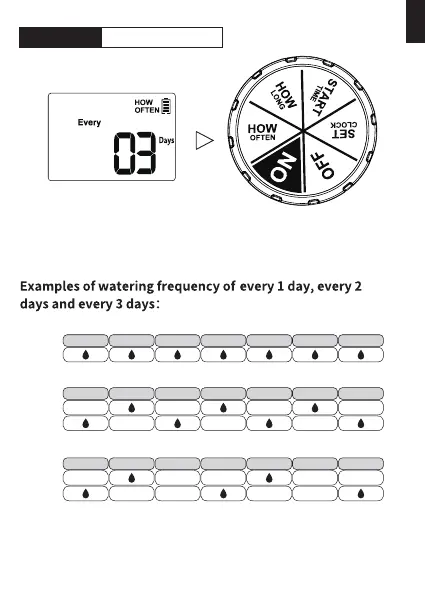
1) Turn the dial to HOW OFTEN.
2) Use "+" and "-" buttons, to set your watering frequency. You
can choose to water eve 1 to 12 hours, or eve 1 to 7 days.
3) Turn the dial clockwise to save the changes in this STEP and go to
next STEP.
EVERY
WEEK
SUNDAY MONDAY TUESDAY WEDNESDAY THURSDAY FRIDAY SATURDAY
SUNDAY MONDAY TUESDAY WEDNESDAY THURSDAY FRIDAY SATURDAY
WEEK
ONE
WEEK
TWO
WEEK
ONE
WEEK
TWO
SUNDAY MONDAY TUESDAY WEDNESDAY THURSDAY FRIDAY SATURDAY
Tips: When the setup of this STEP is nished, please turn the dial to
save the changes instead of press the "OK" button. If you press
the "OK" button after setting, it will return to the previous
setting instead of saving it.
STEP 4: HOW OFTEN
- 10 -
EN



 To Next Page