EasyManua.ls Logo

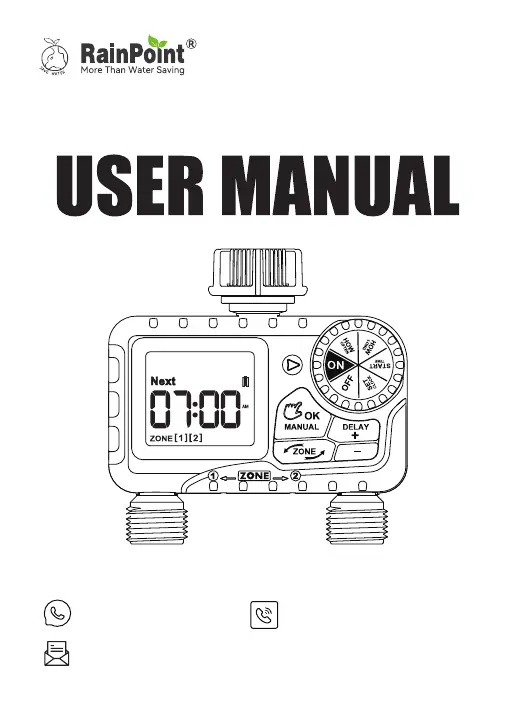
RainPoint ITV205 - User Manual

RainPoint ITV205
44 pages
Print Icon
To Next Page IconTo Next Page
Loading...
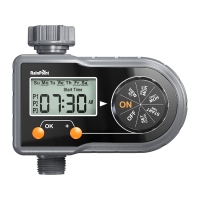
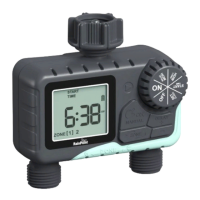
2-Zone Water Timer
Email
seice@rainpointonline.com
WhatsApp
+1 626-780-5952
Free Hotline
US: +1 833-381-5659 (EN)
DE:+49 800-182-0576 (DE, EN)
UK: +44 800-808-5337(EN)
Save the user manual for future reference.
If you have any questions, please contact
us to get suppo.
Model NO.: ITV205

Other manuals for RainPoint ITV205

Questions and Answers

  • K
    Kristen CooperAug 4, 2025
    What to do if my RainPoint ITV205 Timer does not water?
    • M
      Michael WellsAug 5, 2025
      If your RainPoint Timer isn't watering, ensure the dial is in the 'ON' position and the faucet is turned on. Also, check the batteries and replace them with new alkaline batteries if they're dead. If rain delay is active, wait for the schedule to resume.
  • T
    Tracy DavisAug 10, 2025
    What to do if the water doesn't stop or flows out of my RainPoint Timer?
    • J
      Justin ThomasAug 10, 2025
      If water doesn't stop flowing from your RainPoint Timer, first, ensure the tap is off and turn the timer dial to 'ON'. If the valve is blocked, select the zone you want to fix (ZONE 1 or ZONE 2) and run manual watering for 3-5 seconds, then stop it. Repeat this process 5 to 7 times.
  • J
    Joseph MurrayAug 15, 2025
    Why is the battery life so short on my RainPoint Timer?
    • C
      Cynthia ClarkAug 15, 2025
      Short battery life in your RainPoint Timer can occur if you're mixing old and new batteries. Replace all batteries with brand new alkaline batteries. Avoid using carbon or rechargeable batteries, as they have a short and unstable lifespan; alkaline batteries are recommended.
  • M
    Melissa StephensAug 25, 2025
    What to do if my RainPoint ITV205 Timer LCD display became blank?
    • H
      Heather StewartAug 25, 2025
      If your RainPoint Timer's LCD display goes blank, avoid long-term exposure to direct sunlight. Also, check the batteries and replace them with new alkaline batteries if they are dead.
  • D
    dudleylisaAug 29, 2025
    Why is there low water pressure with my RainPoint ITV205 Timer?
    • M
      mccoyrubenAug 29, 2025
      Low water pressure with your RainPoint Timer could be due to a clogged filter. Check the filter and clean or replace it if necessary. Also, ensure the timer is installed properly and not cross-threaded. Consider installing a booster pump or other auxiliary equipment to increase pressure.
  • S
    sarahmasonSep 10, 2025
    How to fix water inlet leakage in RainPoint ITV205?
    • Z
      zacharysmithSep 12, 2025
      To fix water inlet leakage in your RainPoint Timer: * Add a filter and ensure it's placed horizontally in the inlet. * Confirm that the faucet is a standard 3/4" faucet. * Strengthen the connection with seal tape.

Summary

WARM TIPS

Essential Pre-Use Precautions

Key advice and safety measures to follow before operating the water timer for optimal performance and to prevent damage.

PRODUCT OVERVIEW

Timer Components at a Glance

Visual identification of the water timer's main parts, LCD screen, buttons, and dial functions.

PRODUCT INSTALLATION

Installing the Batteries

Step-by-step guide for correctly inserting AAA batteries into the timer, ensuring proper power and sealing.

INSTALLING THE TIMER

ACTIVATE THE TIMER BEFORE USE

PROGRAMMING THE TIMER

Understanding Timer Zones

Explanation of the two-zone system, allowing independent programming for different watering areas.

Setting the Clock

Procedure to set the current time and select the desired 12-hour or 24-hour format.

Setting Start Time

Configure the specific start time for irrigation cycles for each zone independently.

Setting Watering Duration

Define the length of time each zone will water during an irrigation cycle.

Setting Watering Frequency

Determine how often the timer will water, choosing intervals in hours or days.

Automatic Watering Operation

How the timer automatically executes programmed schedules to ensure efficient watering.

ADDITIONAL FUNCTIONS

Rain Delay Mode Functionality

Temporarily postpone watering to conserve water during rainy conditions without losing programmed settings.

MANUAL AND HAND WATERING

OPERATING MODES AND CONTROL

Using a Single Watering Zone

Instructions to disable one zone and operate the timer using only the selected zone.

Timer Off Mode

How to turn off all watering schedules while retaining settings for future use.

Stopping Active Watering

Procedure to immediately stop an ongoing watering cycle without affecting future scheduled watering.

BATTERY STATUS

Battery Level Indicators

Understanding the visual cues for battery status and automatic valve closure for low power.

TROUBLESHOOTING

CLEANING YOUR TIMER

IMPORTANT SAFETY WARNINGS

WARRANTY AND CUSTOMER SUPPORT

Product Warranty Details

Information on the 1-year warranty for manufacturing defects and the process for making a claim.

Customer Service Contact Information

How to contact RainPoint for setup assistance, technical help, or warranty inquiries via email, phone, or WhatsApp.

RainPoint ITV205 Specifications

General IconGeneral
ModelITV205
Power Supply2 x AA batteries (not included)
Working Pressure0.02-0.8 MPa
Water Pressure0.02-0.8 MPa
Valve Connection3/4 inch
MaterialPlastic
Working Temperature3℃-50℃ (37℉-122℉)
Operating Temperature3℃-50℃ (37℉-122℉)

Related product manuals