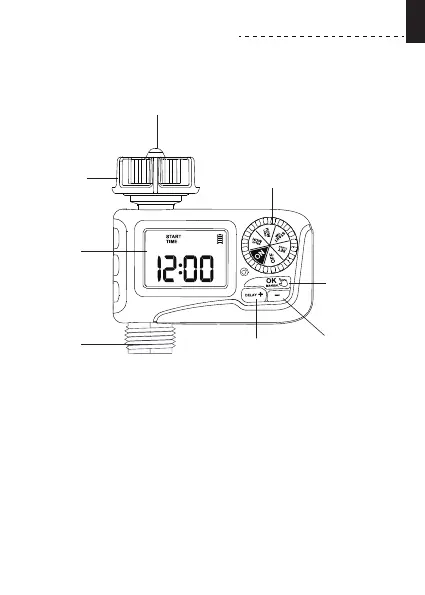
PRODUCT OVERVIEW
At A GLANCE
BIG LCD
SCREEN
OK/MANUAL
BUTTON
DIAL
DELAY/+
BUTTON
- BUTTON
FILTER
HOSE TAP
CONNECTION
OUTLET
• Rotate the dial to customize your watering schedule.
DIAL:
OK / MANUAL BUTTON:
DELAY / + BUTTON :
- BUTTON :
• Use "OK" to conrm the time.
Use "+" to adjust the time. When the
Use "-" to adjust the time.
When the dial is turned to "ON", press and hold "MANUAL"
to water manually.
dial is turned to "ON", press and hold "DELAY" to activate
Rain Delay.
•
•
- 02 -
EN



 To Next Page