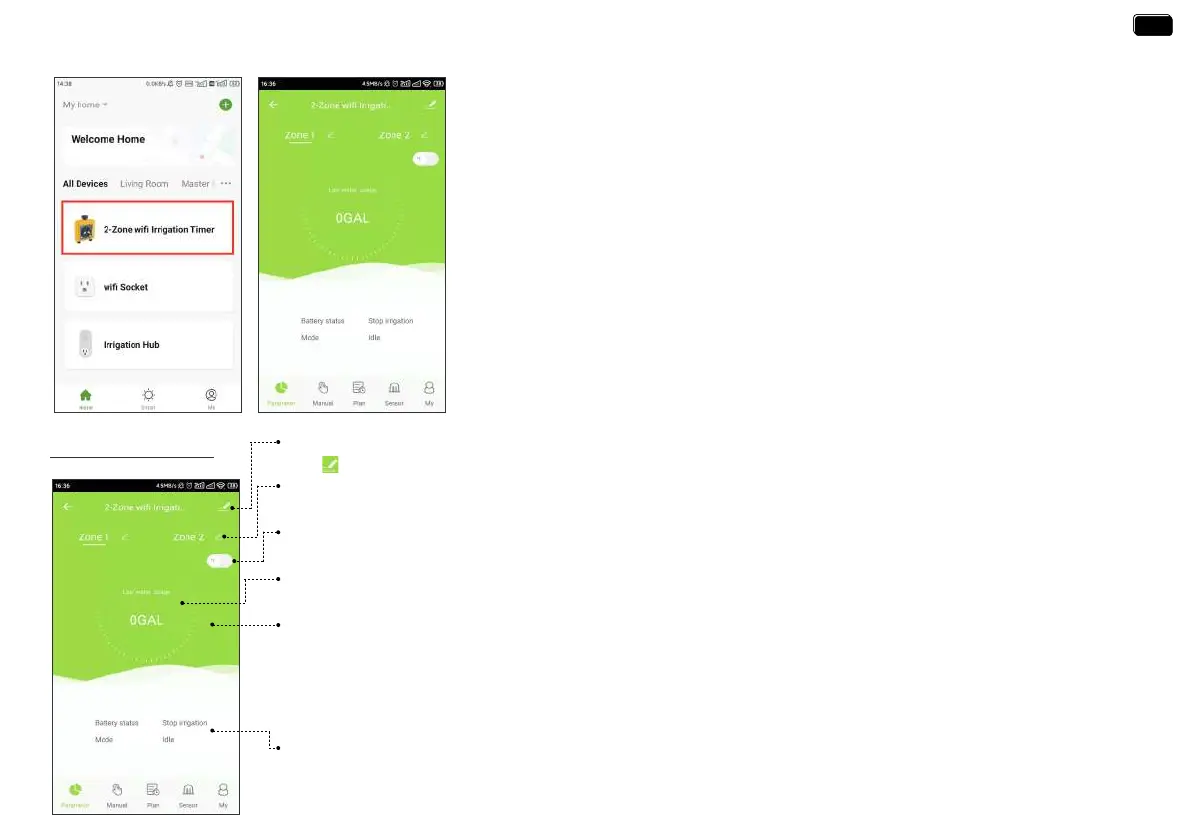
Device Parameter
Device & Third Pay Control
Tap “ ” on the top right of the screen, you will enter the page for device information and third-pay control.
Zone 1 / Zone 2
Select Zone1 or Zone2, the screen will display the data of the corresponding Zone.
Unit Switch
Tap “℉/℃” switch, it will change the unit (℉/℃) of soil temperature and the unit (GAL/L) of water usage.
Last Water Usage
The WiFi water timer has built-in water fow meters, it will display the last water usage on the screen.
Soil Temperature & Moisture
Paired with the RAINPOINT WiFi soil sensor, it can also display soil temperature and moisture.
Working Status
Display the batte level of the timer, the current working mode and the time of the next watering.
Note:
* WiFi soil sensor is sold separately.
* If the soil moisture is higher than the water prohibition level set on the soil sensor, the background color will
change to red.
2-ZONE WIFI IRRIGATION TIMER
Tap the 2-Zone WiFi irrigation timer on the all devices list of APP home screen. It will
display all the parameters and functions of the timer manually set on the APP.
Note:
The WiFi timer will follow and peorm the preset watering schedule after application
set successfully, even if the phone or device loses network connection.
- 15 -
EN
EN


 To Next Page