RESET THE DEVICE
- 26 -
Step 1. Press and hold the button. Please don’t release until the end.
Step 2. Plug in the hub and wait for the BLUE light on (Still keep holding the button)
Step 3. Keep holding the button. Wait for the BLUE light on for a few seconds and then rapidlyash,
then the hub is restored to pair mode.
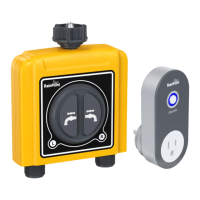
How to reset the WiFi Hub ?
Step 1. Remove all batteries from the batte compament.
Step 2. After 10 seconds, inse 4 fresh AA Alkaline batteries into the batte compament of the timer.
Step 3. While installing the batte, press and hold the left and right button on the timer without releasing the button until the LED indicator
quickly ashed (2 times per second), then the WiFi timer is restored to pair mode.
How to reset the WiFi timer ?
Search the link below to visit the WiFi Hub resetting video
https://youtu.be/ykucYsxRtTs
Search the link below to visit the WiFi Timer resetting video
https://www.youtube.com/playlist?list=PLOUGxY_wJOY-7zzm_D_4jkAjgJITS7p
Please scan the QR code below to get the resetting video quickly.
EN
EN


 To Next Page