STEP 3. CONNECT THE WIFI TIMER
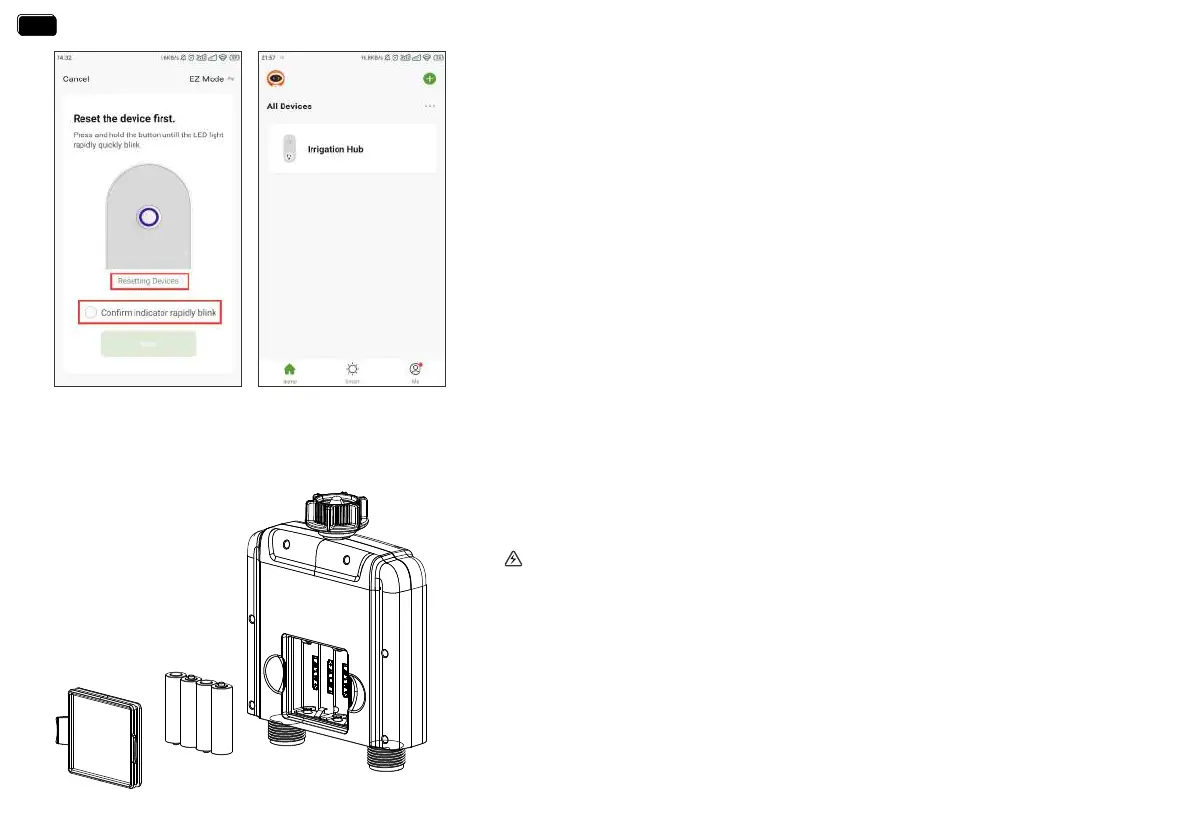
1. Inse 4 new AA alkaline batteries into the batte compament of the timer.
Replace the batte cover and make ceain it is secured.
WARNING:
*Please use only alkaline batteries.
*Do not mix old and new batteries.
*Batteries are to be inseed with the correct polarity.
*Exhausted batteries are to be removed from the product.
*Please remove the batte from long-term no use.
- 10 -
5. Press and hold the WiFi hub button until the power indicator blink rapidly (2 times
per second). Then select "conrm indicator rapidly blink" and tap Next. The APP will
search and pair your WiFi hub automatically.
6. After the connection is successful, the color icon of irrigation hub will be displayed on
the APP home screen.
Note:
If the indicator doesn’t blink rapidly (2 times per second), please tap “Resetting Devices”
and follow the prompts (Or refer to the “RESET THE DEVICE” section of this manual) to
reset the WiFi hub and make the hub indicator blink rapidly.
EN
EN


 To Next Page