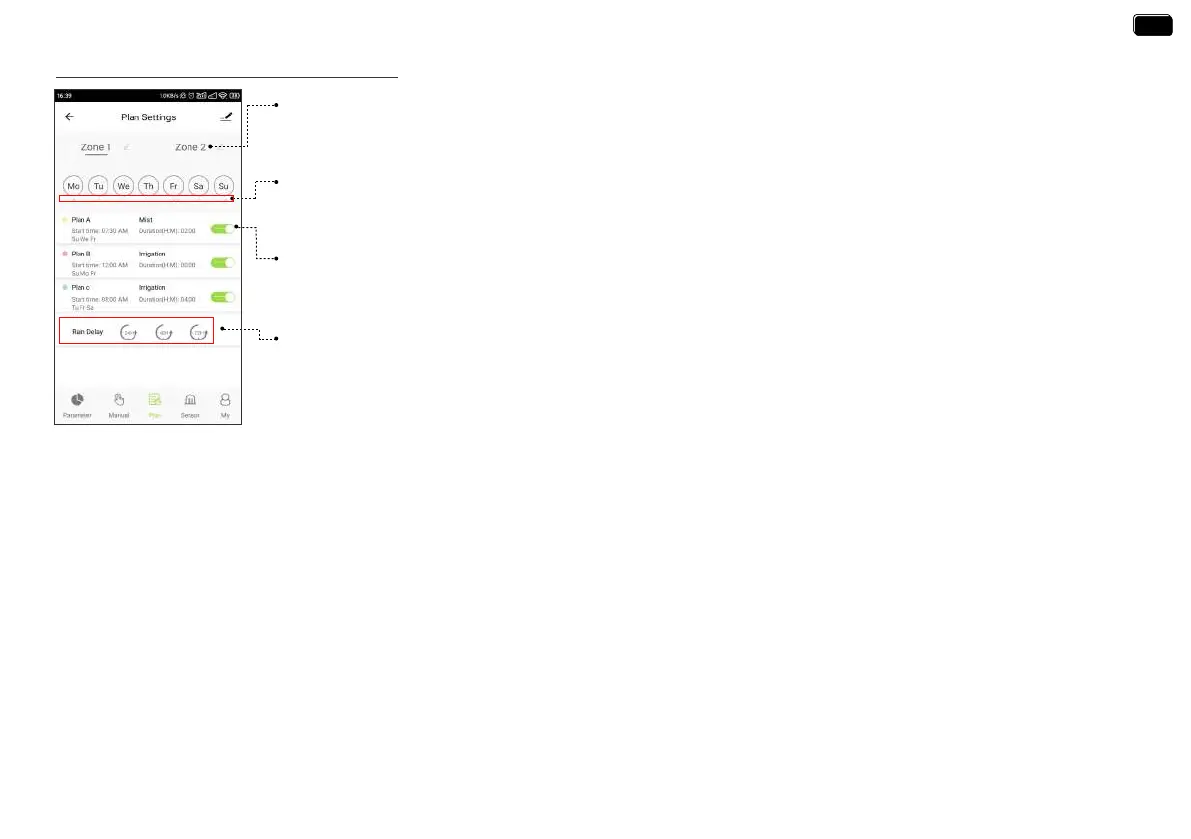
Zone 1 / Zone 2
Select Zone1 or Zone2 for manual watering. Zone 1 controls the left valve of the timer. Zone 2 controls the
right valve of the timer.
Watering Day Of The Week
·How to set the watering plan?
Each plan has a specic color punctuation. The punctuation in a specic color on the day of the week indicates
that there is a corresponding watering plan for that day.
- 17 -
Watering Plan & Manual Rain Delay
Plan A / Plan B / Plan C
Each ZONE can set 3 dierent watering plans eve day. Each watering plan can be set with dierent sta
time, duration and watering day (frequency). Slide the switch of the watering plan to turn it on or o.
Manual Rain Delay
Rain delay applies to rainy days or other weather that causes high soil moisture. During the rain delay, the
timer stops watering. After the rain delay ends, the timer will be executed according to the next watering plan.
Each ZONE can set 24/48/72 hours of rain delay.
1. Tap Plan A/ Plan B/ Plan C on the plan screen of the 2-Zone WiFi irrigation timer.
2. Each watering plan has two watering modes: Irrigation Mode and Mist Mode.
These two modes do not refer to the dierence in the water output of the timer, but the dierent settings of the watering frequency and duration.
Irrigation Mode: Watering at longer inteals
Mist Mode: Watering at shoer inteals
EN
EN


 To Next Page