- 18 -
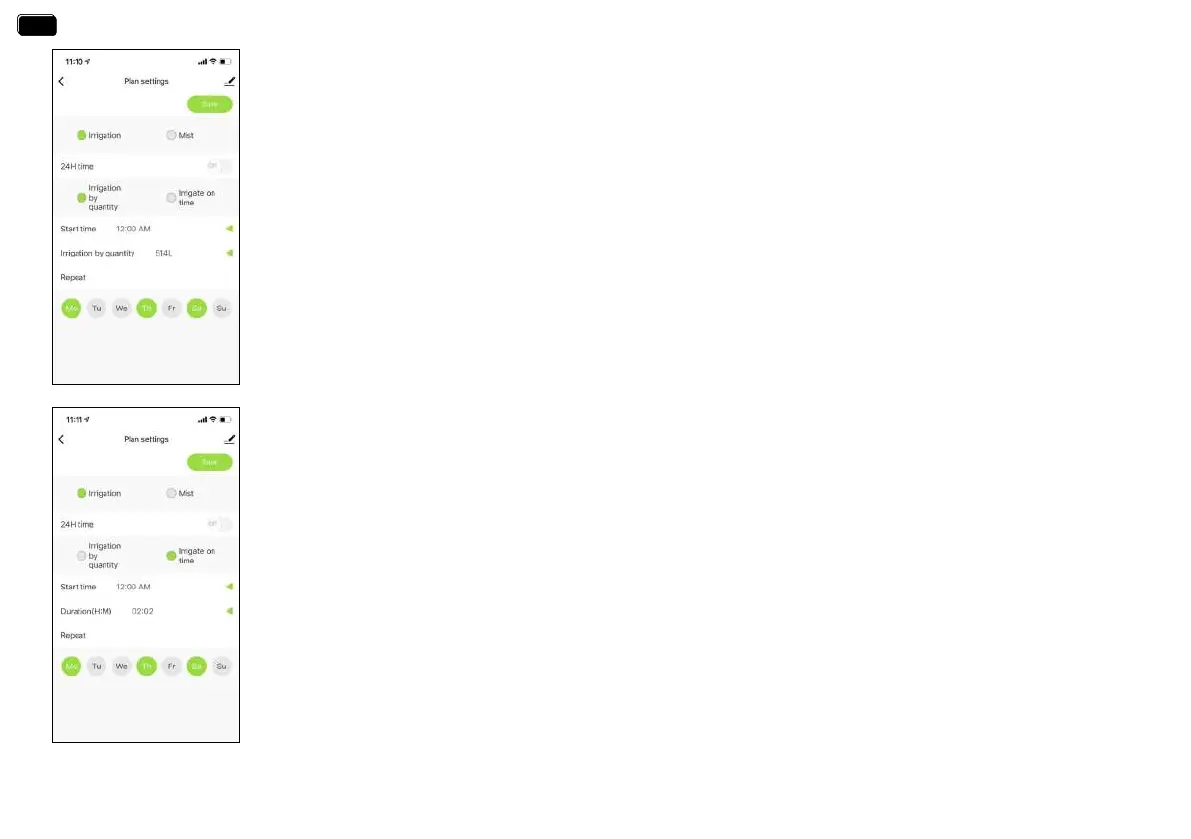
Irrigation Mode (Irrigation by quantity)
3. Tap Irrigation Mode.
4. Use the 24H time switch to toggle between 24hr and AM/PM time.
5. Click to select irrigation on amount.
6. Tap Sta time to open the clock and set a sta time.
7.Click to select irrigation on amount to set the continuous watering volume
(From 1L to 10000L,From 1gallon to 2641 gallons)
8.Select the days to repeat watering eve week as needed.
9. Save your settings.
For example:
The picture on the left shows that the WiFi water timer will water for 514L in irrigation mode.
The sta time is eveMonday, Thursday and Saturday at 12�00 am.
Irrigation Mode (Irrigation on time)
3. Tap Irrigation Mode.
4. Use the 24H time switch to toggle between 24hr and AM/PM time.
5. Click to select irrigation on time.
6. Tap Sta time to open the clock and set a sta time.
7. Tap Duration(H:M) to set a watering duration (from 0 hour 0 minute to 11 hours to 59 minutes).
8. Select the days to repeat watering eve week as needed.
9. Save your settings.
For example:
The picture on the left shows that the WiFi water timer will water for 2 hours and two minutes in irrigation mode.
The sta time is eve Monday, Thursday and Saturday at 12�00 am.
EN
EN


 To Next Page