- 12 -
STEP 4. INSTALL THE WIFI TIMER
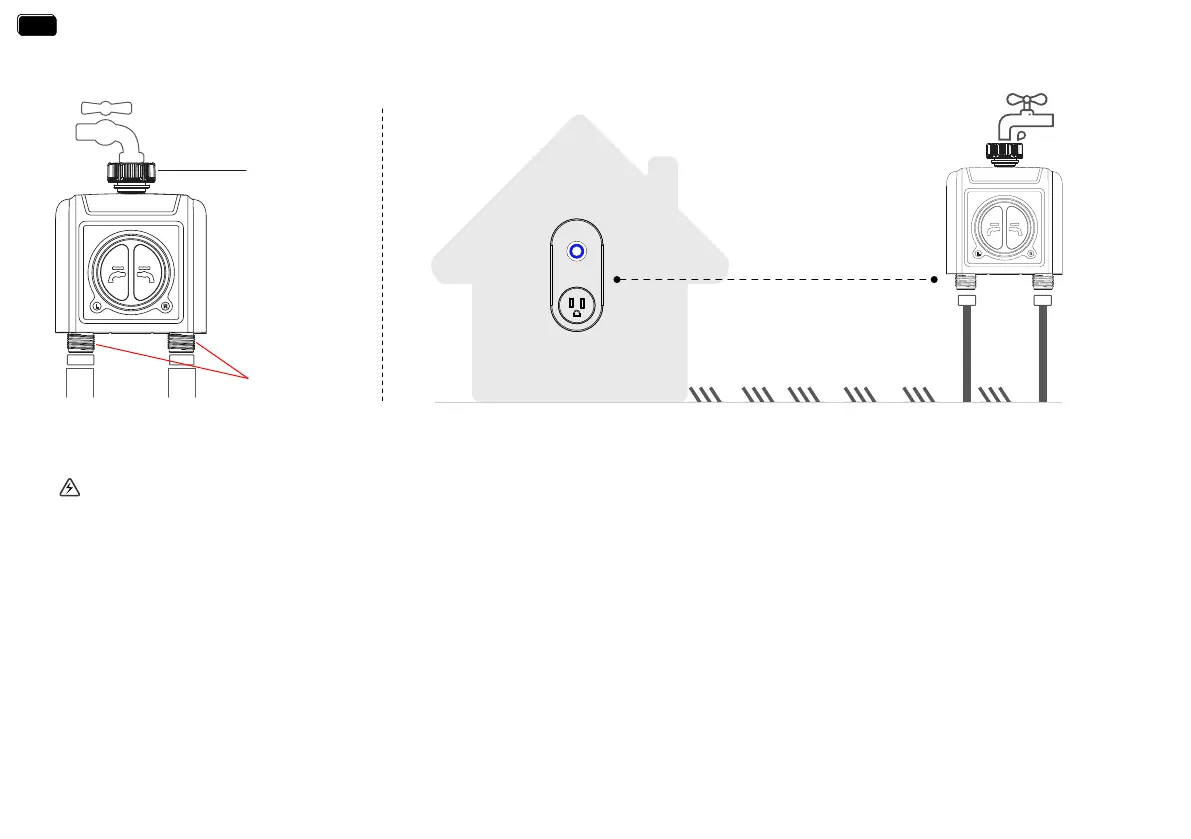
1. Attach the timer inlet to the outdoor faucet/spigot (hand tighten only). From the timer outlet connect a drip irrigation system or a garden hose.
* The WiFi timer can only be used for cold water.
* The WiFi timer uses a 433mHz RF connection to communicate with the WiFi Hub, and must be within a 160ft range, line of sight, of the WiFi Hub.
If there are walls, iron gates or bushes blocking, please shoen the distance between them to better receive the signal.
* Soil will absorb WiFi and RF signals, the best location of the timer is on the faucet 4 to 8 feet (1.2 to 2.4 meters) above the ground.
* Do not place the WiFi timer in an underground valve box or anywhere your WiFi and RF signal will be obstructed.
* Under freezing weather, the water timer should be removed from the tap and placed properly indoor to avoid any danger of freezing.
WARNING:
160 feets
(No bushes, walls blocking)
Timer Inlet
Timer Outlet
EN
EN


 To Next Page