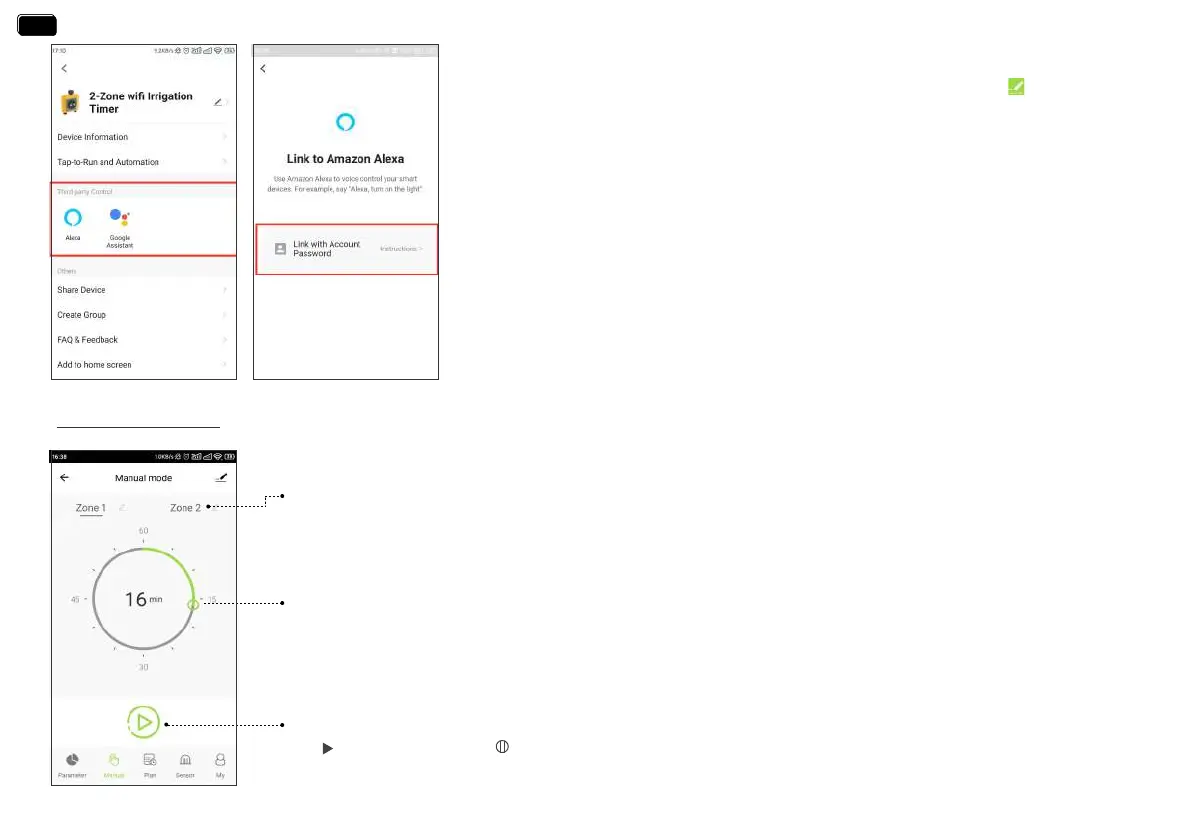
Zone 1 / Zone 2
Select Zone1 or Zone2 for manual watering. Zone 1 controls the left valve of the timer. Zone 2 controls the
right valve of the timer.
Manual Watering Duration
Move the hollow green circle on the dial to set the desired manual watering duration (0~60min).
Sta To Run
Tap to sta watering and to stop
·How to get third-pay control / voice control?
If you have an Amazon Alexa or Google Assistant, please tap the icon “ ” in the upper
right corner of the device page, select a third-pay voice control device you own, then
tap the operation guide, and follow the instructions to connect your WiFi water timer to
the voice control device. After successfully connecting, you can control the WiFi water
timer by voice.
Note:
The WiFi water timer can only peorm simple voice commands, such as “turn on or turn o “.
If you have any questions or suggestions about this feature, please feel free to contact us.
US Free Hotline: +1-833-3815659 UK Free Hotline: +44 800-808-5337
Email: seice@rainpointus.com WhatsApp: +1 626-780-5952
Manual Watering
- 16 -
EN
EN


 To Next Page