V4.1.0R
3
1.Overview
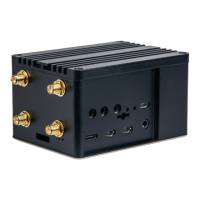
This document complements the RAK7244 with LTE.
More document information please visit our official site, the document hub, the
RAKwireless online store, and/or the forums:
https://www.rakwireless.com/en-int/
https://doc.rakwireless.com/
https://store.rakwireless.com
http://forum.rakwireless.com/
What do you need to prepare?
RAK7244 with LTE
https://store.rakwireless.com/
A 16G SD card, a card reader, and a PC.
Install a writing software on the PC which can be used to burn firmware onto the
SD card, for example, you can use Etcher, which can be download freely from
here:
https://www.balena.io/etcher/
Install an SSH tool on the PC If you are using Windows you can use Putty, which
can be download freely from here:
https://www.chiark.greenend.org.uk/~sgtatham/putty/latest.html
If your OS is Linux or Mac OS, there is a built-in SSH tool already.
Download the latest firmware from RAK website (the name is
“RAK7243_LTE…”):
https://downloads.rakwireless.com/en/LoRa/Pilot-Gateway-Pro-RAK7243/Firmw
are/Raspberry-Pi-4/


 To Next Page