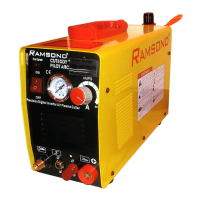
This document describes the RAMSOND CT Series, a digital inverter multifunction welder/cutter. This versatile machine combines three functions: TIG (Tungsten Inert Gas) welding, MMA (Manual Metal Arc) or stick welding, and Plasma cutting. Designed with advanced inverter technology, the CT series units are dual voltage (110V and 220V) and operate on both 50Hz and 60Hz frequencies. The inverter power system converts the standard 50/60Hz working frequency to a high frequency (up to 100Hz) using high power factor V-MOS technology. It then reduces the voltage and rectifies it through Pulse Width Modulation (PWM) to generate high-factor welding and cutting power. This inverter technology significantly reduces the weight and volume of the main transformer compared to conventional machines, while boosting efficiency by over 30%.
When operating in MMA or TIG mode, the RAMSOND CT series exhibits a constant current characteristic, meaning the welding current remains stable regardless of the arc length. This ensures a very stable current for welding operations. In plasma cutting mode, the arc is compressed by rapidly circulating air, which raises its temperature to between 10,000 and 15,000 degrees Celsius, causing ionization and forming a powerful plasma arc. These units are suitable for welding and cutting a wide range of materials, including carbon steel, stainless steel, alloy steel, copper, and other non-ferrous metals. They are characterized by their portability, efficiency, energy-saving capabilities, and stable performance.
Usage Features:
The RAMSOND CT series is designed for ease of use, but adherence to specific operational guidelines is crucial to prevent damage and maintain warranty validity.
- Single Function Operation: It is imperative to operate only one function (TIG, MMA, or Plasma Cut) at a time. Using multiple functions simultaneously will cause severe damage to the unit and void the limited warranty.
- No Switching During Operation: Do not switch between functions while the machine is actively operating. For example, if plasma cutting is in progress, do not change the function selector toggle switch to TIG or MMA.
- Confirm Settings: Always confirm that the function selector is set to the correct position before starting any operation. Attempting to use the plasma torch while the machine is set to TIG will damage both the torch and the unit. Similarly, the plasma torch should not be used in MMA or TIG mode.
- Proper Wiring: Correct connection to the main input power source is critical. Incorrect wiring can lead to severe damage, injury, electrocution, and will void the warranty. Users must follow the provided wiring diagram (Diagram #1) carefully, ensuring proper connection of positive, negative, and ground wires for both 110V and 220V configurations.
- Grounding: For all welding and cutting operations, proper grounding of the workpiece is essential to achieve an adequate arc. Debris, rust, and other particles must be removed from the cutting/welding surface to ensure effective grounding.
- Air/Gas Supply: The machine requires clean air with sufficient pressure for plasma cutting and Argon gas for TIG welding. Never operate the TIG or Plasma function without the appropriate compressed air/gas supply. A multifunction air regulator/filter and an argon gas flow meter are supplied with the machine. The air filter/regulator connects to the back of the machine, with an adjustment knob to control air pressure. The display dial shows the current air pressure. Accumulated water in the glass cup of the filter/regulator should be drained by pulling the bottom nozzle. The argon flow meter connects to the argon tank.
- Amperage Control: The digital amperage display (on DX series models) shows the current setting. It's normal for the display to remain lit for up to one minute after shutdown, to show values slightly exceeding or falling short of maximum/minimum parameters (within 5-10%), and to fluctuate during operation. In case of discrepancy between the digital display and printed panel levels, rely on the digital display.
- Pre-Operation Check: Before turning the unit on or off, ensure the AMP regulation is set to the minimum setting to prevent damage.
TIG Function Operation:
- Ensure proper connections as per Diagram #2.
- Turn on the power switch.
- Move the function selector toggle switch to the TIG position.
- Select an appropriate "AFTER-FLOW" time (3, 6, or 10 seconds). This function maintains argon flow after welding stops to protect the weld spot during cooling. Keep the torch at the welding spot for the designated time.
- Set the desired welding current based on workpiece thickness and technical requirements.
- Push the torch button to activate the HF arc and initiate argon gas flow. Allow gas to flow for a few seconds to purge air from the system.
- Bring the tungsten electrode 1-4mm from the workpiece. Push the control button to generate the HF arc, which will then disappear, allowing TIG welding to begin.
MMA (Stick Weld) Function Operation:
- Ensure proper connections as per Diagram #2.
- Turn on the power switch.
- Move the function selector toggle switch to the MMA position.
- Set the desired welding current based on workpiece thickness, rod type, and technical requirements.
- Begin welding.
Plasma Cut Function Operation:
- Ensure proper connections as per Diagram #3.
- Turn on the power switch.
- Move the function selector toggle switch to the plasma cut position.
- Set the desired current based on workpiece thickness and material.
- Turn on the air regulator and achieve a minimum air pressure of 30 psi.
- Push the torch button to activate the HF arc and initiate compressed air flow.
- Bring the torch tip close to the workpiece (sometimes touching is necessary) to establish the plasma arc. Once the arc starts, maintain a 1mm distance between the nozzle and workpiece to protect consumables.
- Drag Cutting: Position the torch tip slightly above the workpiece, press the switch, and lower the tip until contact is made and the cutting arc is established. Move the torch in the desired direction, keeping it slightly angled and in contact with the workpiece. Adjust speed to maintain spark concentration at the underside of the workpiece, ensuring a complete cut.
- Stand-off Cutting: For thicker materials or to reduce material blow-back, cut with the torch tip raised approximately 1/16" to 1/8" above the workpiece. This technique is also useful for penetration cutting, gouging, or cutting sheet metal to reduce splatter-back tip damage.
- Piercing: Position the tip approximately 1/8" (3.2mm) above the workpiece, angling the torch to direct sparks away from the tip and operator. Initiate the pilot arc, then lower the tip until the main cutting arc transfers. Start piercing on scrap material or a template before moving onto the cutting line. Hold the torch perpendicular to the workpiece after the pierce is complete.
Maintenance Features:
- Consumables Replacement: Before replacing any consumables on the torch (plasma or TIG), ensure the machine is turned off and disconnected from the power source. Consumables like electrodes, swirl rings, tips, and cups are subject to normal wear and tear and are excluded from the limited warranty.
- Cleaning: Clean spatter and scale from the shield cup and tip as soon as possible after plasma cutting operations.
- Air/Gas Supply Maintenance: Regularly check and drain any water accumulation in the glass cup of the air filter/regulator. Ensure the air supply is clean and free of contaminants.
- Troubleshooting: The manual provides a troubleshooting guide for common issues. For "No Torch Arc or Inadequate Arc," check main wiring, power switch, main power, air supply (minimum 30 psi), torch consumables and assembly, torch wire for shorts, and ensure the cutting surface is properly grounded and free of rust. For "O.C. (OVER CURRENT) Light is Lit," this indicates the duty cycle has been reached; wait for the machine to cool down. If the problem persists, it may indicate an internal component issue requiring professional assistance.
- Operating Environment: The machine is designed for harsh environments with temperatures between -10°C and +40°C (-23°F and 5°F) and humidity up to 80%. However, it must not be used in wet or raining conditions. Keep the machine dry and prevent water entry. Avoid using the machine in environments with high concentrations of dust or corrosive gases.
- Thermal Protection: The machine includes thermal protection circuits that will engage if the unit exceeds its duty cycle, stopping operation. The "O.C." indicator on the front panel will light up. The fan will likely continue to run until the unit cools to an acceptable temperature, after which it will resume operation. Exceeding duty cycle ratings can cause damage to the machine.

 Need help?
 General

 To Next Page