22
6.2.5.7 Display
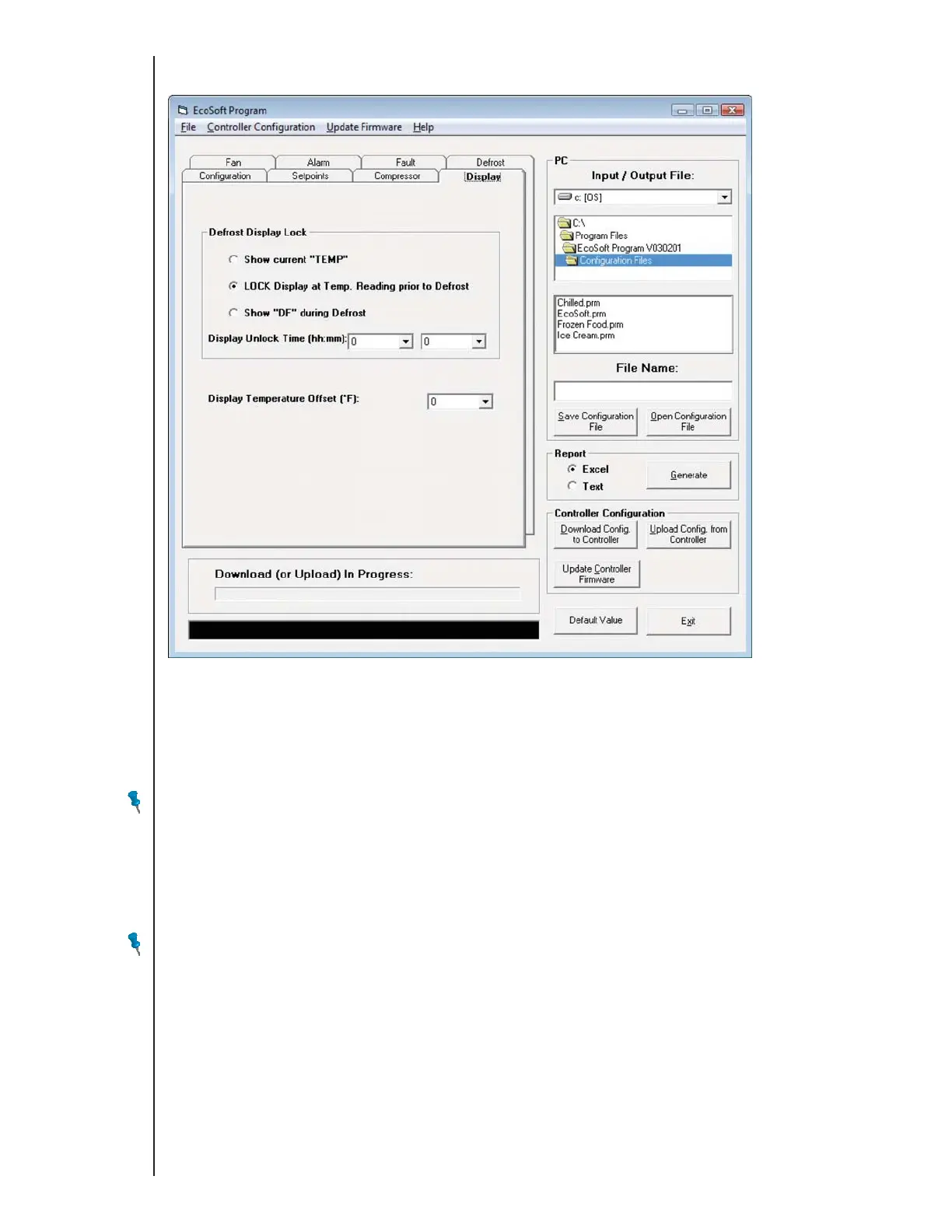
Use the Display tab to specify what is displayed during defrost and to specify a display temperature offset.
Defrost Display Lock
Select Show current “TEMP” to display the sensed control temperature during defrost.
Select LOCK Display at Temp. Reading prior to Defrost to display, for the entire defrost cycle, drip time, and until the first compressor cut-out after defrost,
the temperature that was sensed at the moment the defrost cycle started.
Select Show “DF” during Defrost to display, for the entire defrost cycle, drip time, and until the first compressor cut-out after defrost, DF.
NOTE: Show “DF” during Defrost causes the display to show DF after defrost has terminated.
Display Unlock Time (hh:mm)
This countdown timer cancels the display lock and resumes display of the current control temperature when it expires. The timer starts counting down when
defrost terminates (whether due to elapsed time or sensed temperature) or at the end of the drip time depending upon the configuration.
Display Temperature Offset
The sum of the Display Temperature Offset and the control sensor temperature is displayed.
NOTE: Display Temperature Offset affects the display only and does not change setpoints or configuration parameters.
Type E7 EcoCool™ Electronic Temperature and Defrost Controllers
©2008 Invensys Controls All rights reserved.
DRAFT VERSION



 To Next Page