23
6.2.5.8 Fan
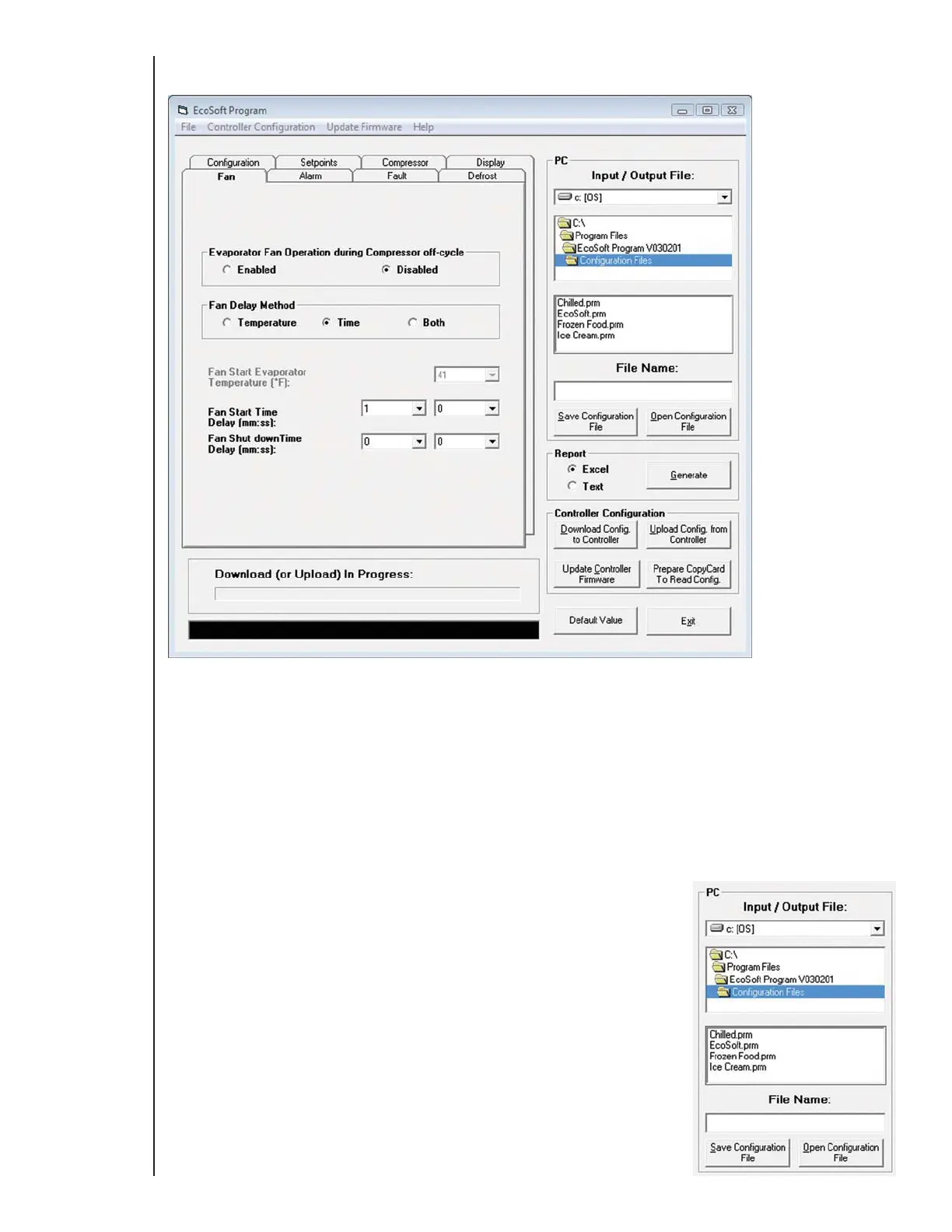
Use the Fan tab to configure fan operation when Defrost Function is disabled.
Defrost Function may be disabled in medium and warm temperature applications where defrost occurs naturally during the compressor off cycle (see 6.2.5.3
Defrost). With Defrost Function disabled, Evaporator Fan Operation during Compressor off-cycle allows the fan to be powered on or powered off during
the entire compressor off cycle.
Disabling both Defrost Function and Evaporator Fan Operation during Compressor off-cycle prevents, the evaporator fan from running during the compressor
off cycle. In this case, Fan Delay Method can delay powering on the evaporator fan when refrigeration cycles on. The delay can be based on a time,
evaporator temperature, or both. If Fan Delay Method is based on time, Fan Start Time Delay starts counting down when refrigeration resumes after
defrost and powers on the evaporator fan when it expires.
If Fan Delay Method is based on evaporator temperature, Fan Start Evaporator Temperature powers on the evaporator fan when the evaporator
temperature decreases to the Fan Start Evaporator Temperature setpoint.
If Fan Delay Method is based on Both time and temperature, the Fan Start Time Delay timer must expire and the evaporator temperature must decrease to
the Fan Start Evaporator Temperature setpoint before the evaporator fan powers on.
If Evaporator Fan Operation during Compressor off-cycle is disabled, Fan Shut down Time Delay can delay the evaporator fan power-off when the
compressor cycles off.
6.2.6 Saving and opening configuration files
By default, configuration files are saved to the C:\Program Files\EcoSoft Program\Configuration Files directory,
but you can specify any directory. To save a configuration file, enter a file name in the File Name: field and click
Save Configuration File. Configuration files are named in EcoCool so that multiple configurations can be stored
on your computer. However, the configuration file name is not included with the configuration file when it is
downloaded to a controller or copy card. Therefore, configuration files must be named when they are uploaded.
All file names automatically get the .prm file name extension.
To open a configuration file, select the configuration file and click Open Configuration File.
Type E7 EcoCool™ Electronic Temperature and Defrost Controllers
©2008 Invensys Controls All rights reserved.
DRAFT VERSION



 To Next Page